
How to Convert Watercolor Paintings to Digital Vectors (2026 Guide)
Preserve your watercolor art as scalable digital vectors. From scan to SVG — here's how artists are digitizing their paintings in 2026.
Founder of VectoSolve
Self-taught developer, founder and sole developer of VectoSolve since 2024. He builds the conversion engine and the cutting, embroidery and 3D printing exports.
How this article was made: drafted with AI assistance, then edited and fact-checked before publication. About the author
Try it on your own file
Free preview, no signup. Drop an image and see the vector before deciding anything.
Key Takeaways
- Vectorizing watercolor art preserves it digitally forever and unlocks commercial opportunities: merchandise, fabric patterns, greeting cards, and web graphics
- Vectorization is a stylistic transformation, not an exact copy -- it creates clean, flat illustrations inspired by your watercolor that many buyers find commercially appealing
- Bold, saturated paintings with strong outlines vectorize best; subtle gradients become discrete color zones in the SVG output
- The ideal workflow: scan at 600 DPI for archival, then vectorize the scan for scalable commercial use -- keep both versions
- Every watercolor painting is a potential product line: one piece can become t-shirts, tote bags, Etsy digital downloads, fabric patterns, and web illustrations
Your Watercolor Art Deserves a Digital Life
Watercolor paintings have a warmth and fluidity that digital tools struggle to replicate. But they are also fragile — paper yellows, colors fade, and one coffee spill can destroy months of work. Digitizing your watercolor art as vector files preserves it forever and opens up commercial opportunities: prints, merchandise, digital products, and web graphics.
In 2026, the process has become remarkably simple thanks to AI-powered tools like VectoSolve.
Vectorize vs. Scan: Understanding Your Options
| Method | Output | Best For |
|---|---|---|
| High-res scan (raster) | TIFF/PNG at 600 DPI | Exact reproduction with all color nuance |
| Vectorization (SVG) | Scalable vector paths | Merchandise, web use, infinite scaling, style variations |
| Both | Scan + SVG | Archive the original, use the vector commercially |
Step-by-Step: Watercolor to Vector
Scan or photograph at high resolution — use a flatbed scanner at 600 DPI for best results. No scanner? Use your phone with good natural lighting (see our phone-to-SVG guide).
Clean up the scan — adjust levels to make the paper pure white and boost color saturation slightly. This helps the vectorizer distinguish paint from paper.
Remove the background — upload to VectoSolve and use the AI background removal to isolate your painting from the white paper. This is especially important for paintings that do not fill the entire page.
Vectorize — convert to SVG. The AI translates your brushstrokes into vector paths, grouping similar colors into clean shapes.
Download and use — your watercolor art is now a scalable vector ready for any application.
Pro Tip: Before vectorizing, slightly boost color saturation (+15-20%) in your scan. Watercolors often appear more washed-out when scanned than they look in person, and the extra saturation helps VectoSolve's AI distinguish between subtle color regions for cleaner vector paths.
A Full Year of Conversions for $49
Starter Annual: 25 conversions every month, $49 for the whole year. That is about $4.08 a month · Cancel anytime
Get the Annual DealWhat Happens to the Watercolor Look?
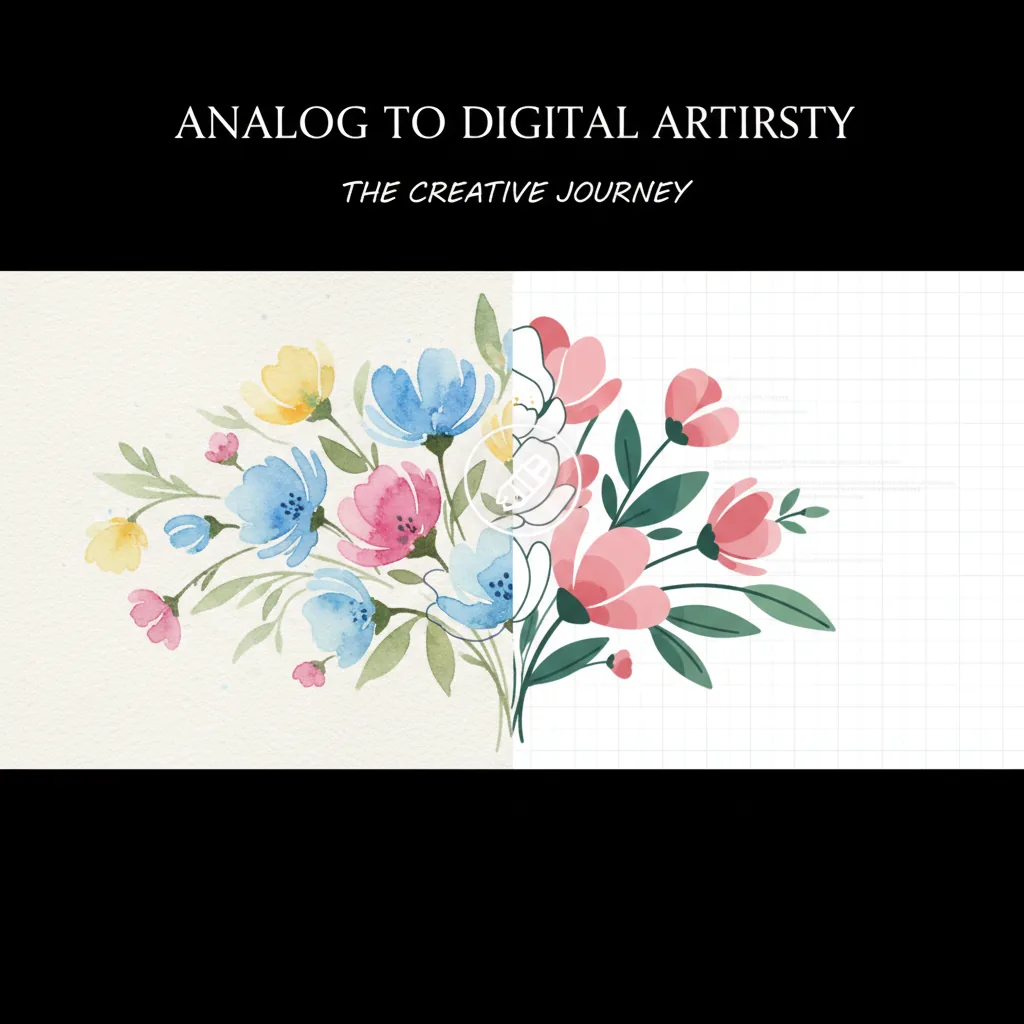
Honest answer: vectorization simplifies your painting. Subtle gradients become discrete color zones. Soft edges become clean boundaries. This is not a limitation — it is a stylistic transformation that many artists and buyers find appealing.
The vectorized version looks like a clean, flat illustration inspired by your watercolor. Think of it as a new interpretation of your art, not a copy. Many artists sell both versions: the original scan as a fine art print, and the vectorized version on merchandise.
Commercial Uses for Vectorized Watercolors
Print on demand — t-shirts, tote bags, phone cases, mugs, and pillows
Etsy digital downloads — sell SVG files for crafters and designers
Fabric patterns — vectorized florals and botanicals for textile design
Greeting cards — clean vectors print beautifully at any card size
Website illustrations — lightweight, scalable, and fast-loading
Brand assets — watercolor-style logos and icons for artisan brands
Vectorized watercolor botanicals are among the top-selling digital product categories on Etsy and Creative Market. A single well-executed floral SVG set can generate recurring passive income as crafters purchase them for Cricut projects, wedding invitations, and surface pattern design.
Tips for Best Results
Bold, saturated paintings vectorize best — strong colors create clear contrast for the AI to trace
Simple compositions work better than complex scenes — individual flowers, animals, or objects vectorize more cleanly than busy landscapes
Use VectoSolve's upscaler first for phone photos — 4x upscaling before vectorization captures more detail from lower-resolution sources
Black ink outlines help — if your watercolor has ink outlines (like botanical illustrations), the vectorizer produces especially clean results
Free SVG Tools for Crafters
Design Checker · Color Separator · Mat Preview · Offset Generator · Text to SVG
Check Your SVG FreeFrequently Asked Questions
Will vectorization ruin my watercolor's delicate gradients?
Vectorization simplifies gradients into flat color zones, which creates a different but often commercially appealing look. For exact reproduction with full gradient detail, use a high-resolution scan. For scalable, versatile commercial use, the vectorized version is ideal.
Can I vectorize a watercolor painting from a phone photo?
Yes. Take a well-lit photo (natural daylight, straight-on angle), upload to VectoSolve, and vectorize. For best results, use VectoSolve's upscaler to enhance the photo first, especially if your phone camera is older.
What art styles vectorize best?
Botanical illustrations, simple florals, animals with strong outlines, geometric patterns, and bold abstract art all vectorize beautifully. Highly detailed realistic paintings with subtle color shifts produce more stylized results.
Can I sell vectorized versions of my watercolor art?
If you painted it, you own it. Vectorization does not change copyright. You can sell the vectorized version as prints, digital downloads, merchandise, or licensed artwork. Many artists earn more from vectorized commercial products than from original painting sales.
Preserve Your Art, Multiply Your Income
Every watercolor painting is a potential product line. Vectorize it, and it becomes a scalable asset that can appear on dozens of products, websites, and digital marketplaces — all while the original hangs safely on your wall.
Vectorize Your First Painting — Free Preview, No Signup ->
| Watercolor Style | Vectorization Complexity | Typical Color Count | Best Commercial Use |
|---|---|---|---|
| Flat wash (single layer) | Easy | 3–8 colors | Greeting cards, fabric prints |
| Wet-on-wet blends | Hard (many gradients) | 10–25 colors | Art prints, wall decor |
| Botanical illustration | Moderate | 8–15 colors | Packaging, stationery, textiles |
| Abstract splatter | Moderate | 5–12 colors | Backgrounds, social media assets |
| Ink & wash (line + color) | Easy | 4–10 colors | Book illustration, merch |