
Convert JPG to SVG: Logos, Scans and Photos into Vector Paths
To convert a JPG to SVG, drop the JPG into the converter above. The shapes under the JPEG compression are traced into paths and returned as an SVG. Logos and flat art come back as a few clean paths; photos come back as hundreds of flat colour shapes. The free preview in the converter is watermarked and needs no signup; the clean file comes with a plan.
What happens to a JPG when it becomes an SVG
JPG is a photo format. To stay small it throws detail away in 8 x 8 pixel blocks, stores colour at a lower resolution than brightness, and leaves faint ripples around hard edges. Zoom into a logo saved as JPG and you see all three: square blocks, a muddy fringe where two colours meet, ghost pixels around the letters.
A tracer that follows every pixel turns that noise into lumpy outlines and stray specks. VectoSolve traces the shapes under the compression instead: in our test, a flat three-colour design saved as a JPG came back as 4 paths in its 3 colours and nothing else. The result is an SVG, a text file of shapes that stays sharp at any size and that design software, cutting machines and lasers can follow.
Two things a JPG never had, and the SVG cannot get back:
- Transparency. A JPG has no alpha channel, so a logo saved as JPG always sits on a background, usually white.
- Detail lost to compression. A JPG re-saved many times has no clean edge left to find, and the trace inherits the blur.
Nine real JPGs, converted and measured
Every picture in our before-and-after test was a JPG: a weathervane photo, a 1914 book scan, a flat design, objects on busy backgrounds, a child's drawing and two ornaments. Our design team ran each one through VectoSolve once, between 28 September and 2 October 2026, with the default settings of the page it was made on and no cleanup, then measured the SVG from the file.
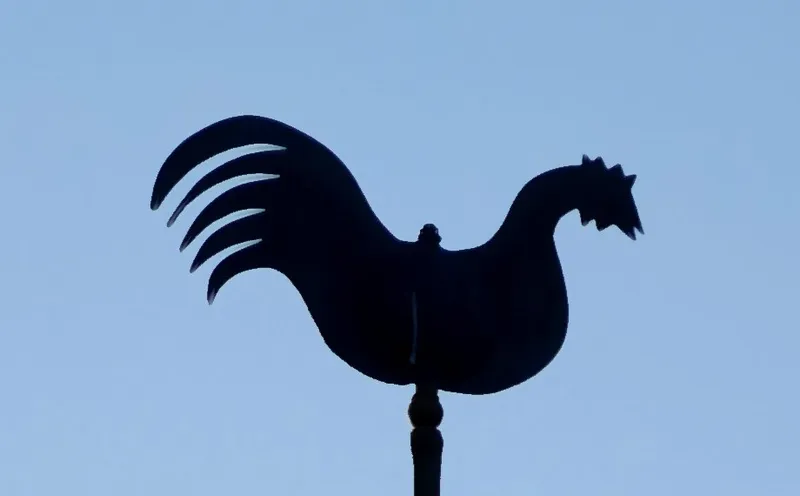
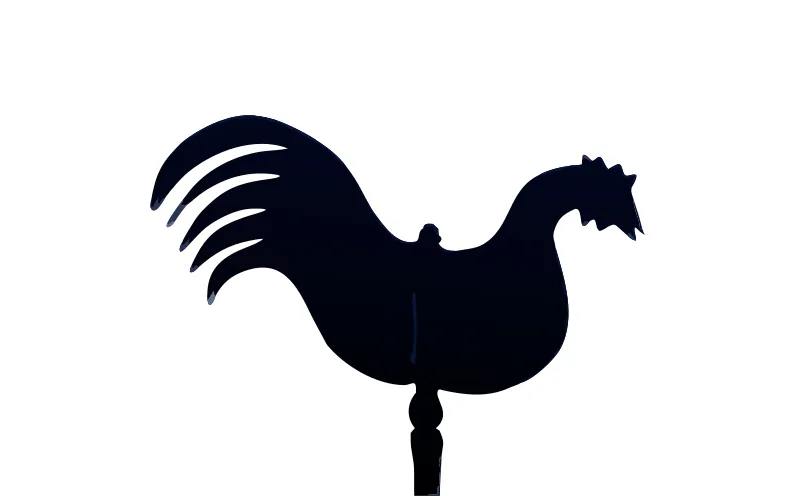
Picture: GirsterklausKirchturmhahnH5a.jpg, by Helge Klaus Rieder, CC0 1.0. Cropped or resized, colours untouched.
- Weathervane rooster, a dark silhouette on a plain sky: 17 paths, 4 fills, 12.5 KB from a 27.2 KB JPG. Sky removed, outline clean, the rod kept. The body carries a near-black gradient, fine on screen and ignored by a cutter.
- Whale from a 1914 book scan, yellowed paper with print specks: 12 paths, 3 fills, 7.6 KB from a 26.7 KB JPG. The paper is gone; a few faint scan lines on the head survive as tiny extra paths.
- Red straw star, a photo with fine texture: 848 paths and 499 KB from an 85.5 KB JPG. The star shape is right, but every straw became shaded slivers. Here JPG to SVG does not give you a usable cut file: you would redraw the six points as one outline.
The full set, with every SVG to download and the open-source Potrace trace run on the same pictures, is on nine real conversions, measured.
Logo JPG or photo JPG: two different results
The same file extension covers two kinds of picture, and they convert in opposite ways.
- A logo or flat graphic saved as JPG. A few solid colours hide under the compression. The SVG comes back as a handful of paths close to the original artwork: 4 to 17 paths for the flat art and silhouettes of our test.
- A photograph. There are no clean shapes to recover, so the SVG is a picture made of flat colour regions: 147 to 2,340 paths in the test. It looks like screen-print art. That is useful for stickers, posters or engraving with shading, not for a one-colour decal, and it is never a faithful copy of the photo.
If the photo has to stay a photo, keep the JPG. If you want a cut line from it, expect to keep only the outline.
Prepare the JPG: five checks that change the result
- Use the least compressed copy you have. Each re-save, chat app or screenshot adds blocks. The original export beats a copy forwarded three times.
- At least 800 px on the long side. More pixels give the tracer more real edge to work with. Our smallest clean result came from a 920 x 570 px photo. Uploads up to 25 MB are accepted.
- Plain background, or remove it. On a plain sky or plain paper the trace is clean; on peeling paint or bark the background turns into specks. The converter warns you when it detects a busy background.
- Crop to the part you want. A logo photographed on a T-shirt traces better once the shirt is cropped away.
- Count the colours. One colour for a decal, three for a three-layer project. Texture and shading become hundreds of pieces.
If you still have the PNG or the original artwork, start from that: PNG has no JPEG compression to undo, and the PNG to SVG converter on our home page covers that case.
After the conversion: cut, edit or change format
- Cricut or Silhouette: upload the SVG as a cut image in Design Space, or in Silhouette Studio Designer Edition and up. If the white background of the JPG came back as a shape, delete it in the SVG editor before you cut. SVG for Cricut covers layers and weld.
- Laser or CNC: the SVG imports in LightBurn, xTool Creative Space and Glowforge. For a DXF, use JPG to DXF.
- Print: for an EPS, use JPG to EPS; for Illustrator, JPG to AI.
- Web: run the file through optimize SVG before it goes on a page.
Not sure SVG is the format you need? JPG to vector lists the other vector formats for a JPG source. Public reviews of VectoSolve: 4.1 out of 5 on G2, from 4 reviews.
How Does AI Vectorization Compare to Manual Tracing?
Manual Tracing
VectoSolve AI
What Is the Best JPG to SVG Converter in 2026?
VectoSolve uses AI-powered vectorization to deliver faster, more accurate results than traditional auto-trace tools. Here's how it compares:
| Feature | VectoSolve | Convertio | AutoTracer | Vectorizer.ai |
|---|---|---|---|---|
| AI-Powered | ||||
| Speed | 2–5 sec | 10–30 sec | 5–15 sec | 5–10 sec |
| Edge quality | Clean, precise paths | Varies | Varies | Good |
| Free Tier | Watermarked preview | 2/day | Unlimited | None |
| Price/Conversion | From $0.11 on a yearly plan | $0.15 | Free | $0.99 |
| Output Formats | SVG, DXF, EPS, PDF | SVG only | SVG, EPS | SVG, PNG |
| Batch Mode | 50 files | 10 files | 1 file | 10 files |
| Background Removal | ||||
| No Signup Required | For previews |
Data as of March 2026. Prices and features may vary. AutoTracer offers unlimited free conversions but with lower accuracy and no AI.
How to Convert JPG to SVG
3 simple steps, no software needed
1. Upload Your JPG
Drag and drop or click to upload your jpg file
2. AI Converts Instantly
Our AI traces edges and creates clean vector paths
3. Download SVG
Get your scalable SVG file ready to use
Why Should You Use VectoSolve for JPG to SVG Conversion?
Trusted by designers, developers and crafters
AI-Powered Accuracy
Our AI analyzes your image and creates the cleanest possible vector output
Automatic Background Removal
Option to automatically remove backgrounds during conversion
Fast Processing
Most conversions complete in just 2-5 seconds
No Software Required
Works entirely in your browser - no downloads needed
High Quality Output
Professional-grade SVG files ready for any use
Commercial License
Use converted files for any purpose including commercial
What Do Users Ask About This Converter?
6 questions about JPG to SVG conversion
Drop the JPG into the converter at the top of this page. The shapes are traced into paths and shown as a watermarked preview; the clean SVG downloads with a plan. JPG and JPEG are the same format and both are accepted, up to 25 MB.
Less than in the JPG itself. In our test, a flat three-colour design saved as a 34.4 KB JPG came back as 4 paths in its 3 colours, with nothing else traced. A blurry or heavily re-saved JPG still gives wobblier outlines, so start from the best copy you have.
Yes, but the SVG is a picture made of flat colour shapes, not a copy of the photo. Our photo tests came back with 147 to 2,340 paths. That suits printing and engraving; for a cut file you usually keep only the outer outline.
A JPG has no transparency to keep: it always sits on a background, usually white, and that background can come back as a shape behind the design. Run the conversion again without the background when the converter offers it, or delete that shape in the SVG editor.
For flat art, yes: two to four times smaller in our tests, for example 27.2 KB to 12.5 KB for the weathervane rooster. For photos, no: a straw star went from 85.5 KB to 499 KB.
The preview is free and needs no signup; it carries a watermark. You get one preview a day. For the clean file you need a plan; current prices are on the pricing page.
Explore More
VectoSolve vs GIMP: Vectorization vs Image Editing
VectoSolve vs ChatGPT: Vector Conversion vs AI Generation
VectoSolve vs Cricut Design Space Web: Browser-Based Comparison
Best Alternative to ChatGPT for SVG & Vector Creation in 2026
Best Online-Convert Alternative for SVG in 2026
How to Convert a Logo to Vector Format
How to Make SVG Files for Cricut
Where Can You Learn More About JPG to SVG Conversion?
ChatGPT image to SVG or DXF: how to vectorize an AI-generated picture
A ChatGPT image is a PNG. Here is how to turn it into a clean SVG for design tools or a DXF for laser cutters and CAD, on the web or directly inside ChatGPT with the VectoSolve app.
Glowforge SVG Requirements: File Rules, Cut vs Engrave Mapping, and Artwork That Uploads Right
Glowforge publishes fewer hard limits than you'd expect — the real SVG requirements are about how the file is built. Here's how the app maps strokes to cuts and fills to engraves, the constraints that actually exist in Glowforge's own documentation, and how to prepare converted artwork so it uploads clean.
xTool File Formats: What XCS Accepts, SVG vs DXF, and How to Prep Files That Just Work
xTool Creative Space imports eight file formats, but only two of them are vectors — and how you prepare them decides whether your job cuts cleanly or fails at import. Here is the documented format list, how XCS turns SVG colors into layers, when DXF is the smarter choice, and the beginner mistakes that ruin converted files.