
Vectorizing Vintage Photos: Restoration and Artistic Recreation
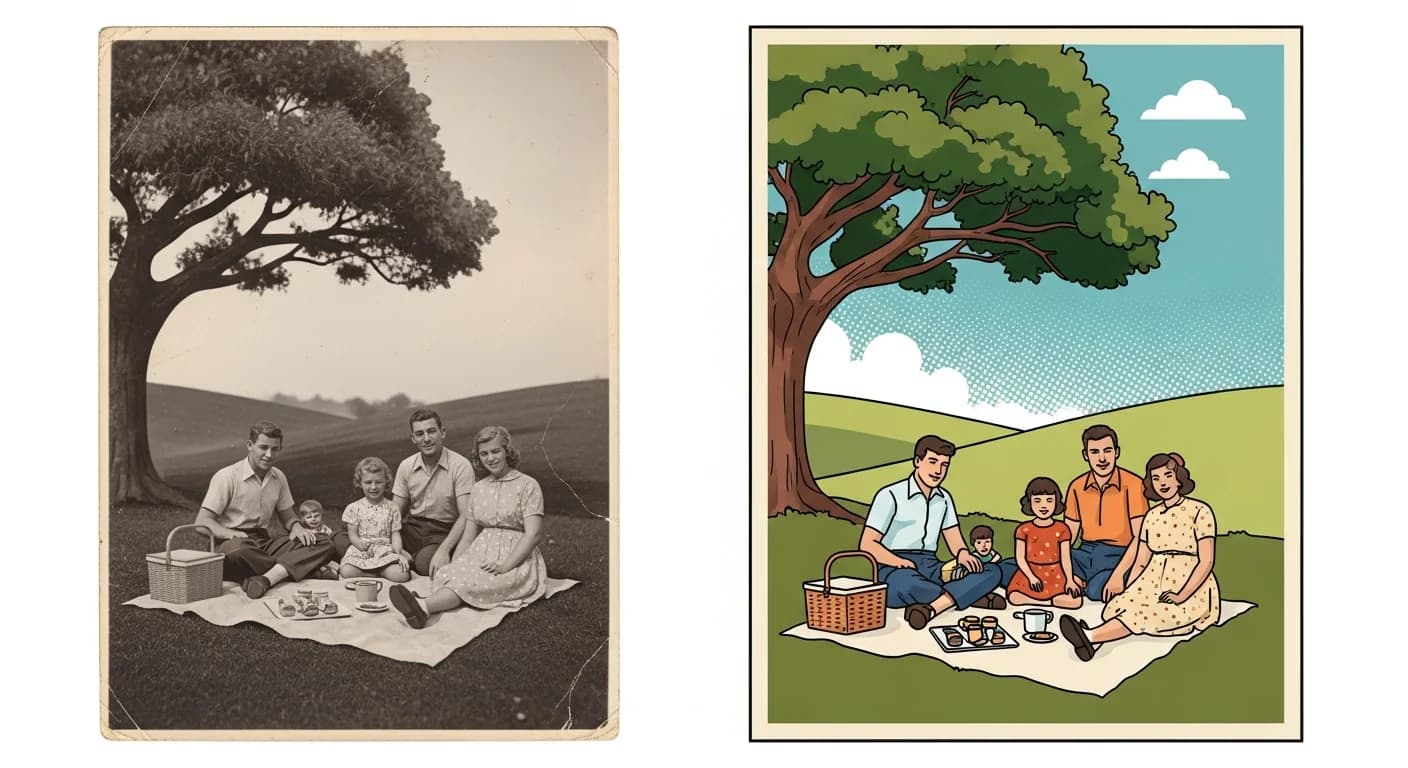
Transform old photographs into stylized vector illustrations. Create timeless artwork from family photos, historical images, and vintage portraits.
Founder of VectoSolve
Self-taught developer, founder and sole developer of VectoSolve since 2024. He builds the conversion engine and the cutting, embroidery and 3D printing exports.
How this article was made: drafted with AI assistance, then edited and fact-checked before publication. About the author
Try it on your own file
Free preview, no signup. Drop an image and see the vector before deciding anything.
Key Takeaways
- Vectorizing vintage photos preserves irreplaceable memories in a format that survives any medium, any resolution, any era
- Proper scanning (600+ DPI, flatbed, dust-free glass) is the foundation of every successful restoration-to-vector project
- Different damage types -- fading, tears, stains, foxing -- each benefit from specific vectorization approaches
- Upscaling faded photos before vectorizing dramatically improves AI tracing accuracy
- Artistic styles like pop art, line art, silhouette, and watercolor let you honor the original while creating something new
- Memorial and tribute projects carry profound emotional weight -- approach with sensitivity and technical excellence
Why Vectorize Vintage Photographs?
There is something sacred about an old photograph. The yellowed edges, the careful pose, the expression caught in silver halide crystals decades ago -- these images connect us to people and moments we can never revisit. But paper deteriorates. Prints fade. Every year, these irreplaceable windows into our history grow dimmer.
Vectorization offers something no other method can: a version of that photograph that will never degrade, never lose resolution, and never fade. When you convert a vintage photo into a vector illustration through VectoSolve, you translate analog memory into mathematical permanence.

Preservation That Outlasts Any Medium
Traditional restoration produces another raster image -- still pixels. Zoom in far enough and it falls apart. A vector version produces clean mathematical curves that render perfectly at any size, from a postage stamp to a billboard.
Artistic Recreation and Reinterpretation
Vectorization doesn't just preserve -- it reimagines. A faded 1920s portrait becomes a striking pop art print. A crumbling family group photo transforms into an elegant line drawing for a reunion banner.
Merchandise, Prints, and Keepsakes
Once vectorized, a vintage photo can be screen-printed onto shirts and bags, laser-engraved into wood or metal, printed at any scale, or embroidered using digitized stitch paths from clean vectors.
Scanning Old Photos: Best Practices
Before vectorization can happen, you need a quality scan. This step is more critical than most realize -- a poor scan creates problems even the best AI cannot overcome.
Scanner Settings Matter: Use a flatbed scanner, not a phone camera. Set resolution to 600 DPI minimum (1200 DPI for wallet-size prints). Save as TIFF or PNG -- never JPEG, which introduces compression artifacts that confuse tracing algorithms.
The Scanning Workflow
- Clean the scanner glass with a microfiber cloth -- dust becomes permanent artifacts
- Handle originals with cotton gloves to prevent oil transfer
- Place photo face-down, aligning carefully to avoid skew
- Scan in color even for B&W photos (captures more tonal data)
- Save the raw scan before adjustments -- this is your archival master
Pro Tip: Upscale before vectorizing faded photos. If your vintage print is small or severely faded, run it through VectoSolve's AI Upscaler first. Upscaling from 600 DPI to an effective 2400 DPI recovers detail invisible to the naked eye, giving the vectorization AI dramatically more to trace. This single step can mean the difference between a muddy vector and a crisp, emotionally resonant illustration.
Damage Types and Vectorization Solutions
Every old photograph tells two stories: the one it captured, and the one time has written across its surface.
| Damage Type | Appearance | Vectorization Approach | Result |
|---|---|---|---|
| Fading | Washed-out tones | Increase contrast pre-scan; upscale | Clean paths with restored tonal separation |
| Scratches | White or dark lines | AI tracing naturally ignores thin linear artifacts | Scratch-free output in most cases |
| Tears/creases | Physical breaks, fold lines | Digital repair before vectorizing | Seamless illustration with no damage trace |
| Foxing | Brown/yellow dots from fungal growth | Desaturate and increase contrast | Clean vector; spots below tracing threshold |
| Water damage | Warped areas, tide marks | Flatten warped scans; adjust levels | Simplified vector ignores subtle staining |
| Silver mirroring | Metallic sheen on dark areas | Scan at slight angle to reduce glare | Vector captures detail beneath mirroring |
Warning: Preserve the original feel. It's tempting to over-clean a vintage photo before vectorizing -- removing every speck, smoothing every imperfection. But character lives in those imperfections. The grain of 1950s Tri-X film, the soft focus of an early portrait lens, the uneven chemistry of a tintype -- these make old photos authentic. Over-processing strips the soul. Clean enough to vectorize well, but not so much that you lose the era.
A Full Year of Conversions for $49
Starter Annual: 25 conversions every month, $49 for the whole year. That is about $4.08 a month · Cancel anytime
Get the Annual DealArtistic Styles for Vintage Vectorization
Pop Art Treatment
Take a stately 1940s portrait and explode it into bold, flat color blocks. High contrast, limited palette, repeated in different colorways. Works brilliantly for gallery walls, event decorations, and social media tributes.
Line Art and Contour Drawing
Strip the image to its essential outlines and contours. Elegant, sketch-like quality that feels both timeless and contemporary. Perfect for engraving, minimalist memorial designs, and personal stationery.
Silhouette Style
Pure black and white, no gradients, no midtones. A strong profile becomes a striking cameo. Ideal for framed shadowbox art, vinyl decals, and logo-style family crests.
Watercolor Effect
Mimics the translucency and bleed of watercolor. Gentle washes, soft edges. Particularly moving for memorial pieces, nursery art from grandparent baby photos, and family history book illustrations.
Memorial and Tribute Projects
This is where the work becomes deeply personal. When someone asks you to vectorize a photograph of a loved one who has passed, you are holding something precious.
- Listen to the story behind the photo before beginning -- understanding who this person was informs every decision
- Preserve identifying details -- the curve of a smile, the way they held their hands, a signature accessory
- Offer multiple styles so the family can choose what feels right
Memorial vectorizations are used for celebration of life programs, engraved plaques, printed quilts, tattoo references, and remembrance cards. Each has different requirements, but all share one purpose: keeping someone's image alive.
The Complete Workflow
Pre-vectorization checklist:
- Levels/Curves: Expand tonal range to full black-to-white
- Dust & Scratches filter: Radius 1-2px, conservative
- Clone Stamp: Address tears, major stains, missing areas
- Crop: Remove damaged borders, focus on subject
- Sharpen: Gentle unsharp mask (Amount: 80, Radius: 1.2)- Assess the photo's condition, era, and process type
- Scan at 600+ DPI, TIFF format, color mode
- Prepare digitally -- adjust contrast, repair damage, crop
- Upscale faded originals via VectoSolve Upscaler
- Vectorize through VectoSolve -- AI traces edges, tones, and structure
- Refine -- adjust detail, choose style, ensure likeness is preserved
- Export as SVG, PDF, and PNG at multiple resolutions
Free SVG Tools for Crafters
Design Checker · Color Separator · Mat Preview · Offset Generator · Text to SVG
Check Your SVG FreeTransform Your Heritage Photos
Every day that passes, vintage photographs fade a little more. But you can intervene. Take those fragile, fading prints and translate them into vectors that will look as crisp a hundred years from now as they do today.
Start with your most meaningful photo. Scan it carefully. Upload it to VectoSolve and watch AI transform it into something permanent. Your family's story deserves to be told in a format that lasts forever.
| Damage Type | Restoration Technique | Vectorization Approach | Difficulty |
|---|---|---|---|
| Fading / low contrast | Levels + curves adjustment | High-contrast threshold trace | Beginner |
| Scratches / creases | Clone stamp + healing brush | AI-assisted gap filling | Intermediate |
| Missing corners / tears | Content-aware fill + manual painting | Trace preserved areas, redraw missing | Advanced |
| Water damage / stains | Channel separation + selective erasing | Multi-pass trace with color exclusion | Advanced |
| Yellowed / discolored | Desaturate + auto-levels | Grayscale or B&W trace | Beginner |