
Upscaling E-Commerce Product Photos: Boost Sales with Better Images
Product images directly impact purchasing decisions. Learn how to use AI upscaling to create professional product photos that convert.
Founder of VectoSolve
Self-taught developer, founder and sole developer of VectoSolve since 2024. He builds the conversion engine and the cutting, embroidery and 3D printing exports.
How this article was made: drafted with AI assistance, then edited and fact-checked before publication. About the author
Try it on your own file
Free preview, no signup. Drop an image and see the vector before deciding anything.
Key Takeaways
- Product images are the #1 factor in online purchase decisions — 75% of shoppers rely on photos alone
- Upgrading from 500px to 2000px+ images can increase conversion rates by 25–40%
- Amazon, Shopify, Etsy, and eBay each have strict image size requirements you must meet
- The ROI on upscaled product photos is massive: a $50/month tool can drive $5,000+ in extra revenue
- AI-powered upscaling delivers studio-quality results without expensive reshoots
Why Product Image Quality Makes or Breaks E-Commerce Sales
For most online sellers, one thing holds true: your product photos are your most important sales asset. Not your copy. Not your pricing. Not even your reviews — though those matter too. It's the images.
The data backs this up. According to research from Salsify, 75% of online shoppers say product photos are the most influential factor in their purchase decision. Etsy's own seller handbook reports that listings with high-resolution images receive 3.2x more views than those with blurry or undersized photos.
The problem? Many sellers start with mediocre photos — maybe shot on a phone, maybe pulled from a supplier's catalog at low resolution. Reshooting everything professionally can cost thousands. That's where AI-powered image upscaling changes the game.
Platform-Specific Image Requirements You Must Meet
Every major marketplace has strict image guidelines. Fall below these thresholds and your listings get suppressed, lose the zoom feature, or simply look terrible on modern high-DPI screens. Here's what each platform demands:
Amazon
| Requirement | Minimum | Recommended | Notes |
|---|---|---|---|
| Main image dimensions | 1000 x 1000 px | 2000 x 2000 px | Enables zoom on desktop & mobile |
| File format | JPEG, PNG, TIFF, GIF | JPEG (sRGB) | CMYK images may render incorrectly |
| Background | Pure white (RGB 255,255,255) | Pure white | Main image only; lifestyle images exempt |
| Product fill | 85% of frame | 85–95% | Product must dominate the frame |
| Max file size | — | 10 MB | Larger files get compressed server-side |
| Image count | 1 | 7–9 | Use all slots for maximum conversion |
Warning: Amazon will suppress your listing from search if your main image is below 1000px on the longest side. Many sellers don't realize their images were downscaled during upload. Always verify after publishing.
Shopify
| Requirement | Minimum | Recommended | Notes |
|---|---|---|---|
| Product image size | 800 x 800 px | 2048 x 2048 px | Square ratio preferred for consistency |
| Max resolution | — | 4472 x 4472 px | Shopify auto-generates multiple sizes |
| File format | JPEG, PNG, GIF, WebP | JPEG or WebP | WebP saves 25–35% bandwidth |
| Max file size | — | 20 MB | Keep under 5 MB for fast loading |
| Aspect ratio | Any | 1:1 (square) | Consistent ratios improve grid layout |
Etsy
| Requirement | Minimum | Recommended | Notes |
|---|---|---|---|
| Listing image size | 2000 px (shortest side) | 3000 x 2400 px | Etsy uses a 5:4 aspect ratio in search |
| File format | JPEG, PNG, GIF | JPEG | PNG for transparent/graphic items |
| Thumbnail display | — | 570 x 456 px crop | Design around the crop zone |
| Image count | 1 | 10 | Fill all 10 slots; Etsy rewards completeness |
eBay
| Requirement | Minimum | Recommended | Notes |
|---|---|---|---|
| Image dimensions | 500 x 500 px | 1600 x 1600 px | Enables eBay's zoom/enlarge feature |
| File format | JPEG, PNG, GIF, WebP | JPEG | Fastest load times in eBay's CDN |
| Max file size | — | 12 MB | Recommended under 7 MB |
| Background | No requirement | White or light gray | Clean backgrounds win in search results |
Pro Tip: Don't just meet the minimum — exceed it. Images at 2x the minimum resolution tend to hold up better than those at exactly the threshold. The platforms' compression algorithms work better with more source data to work with.
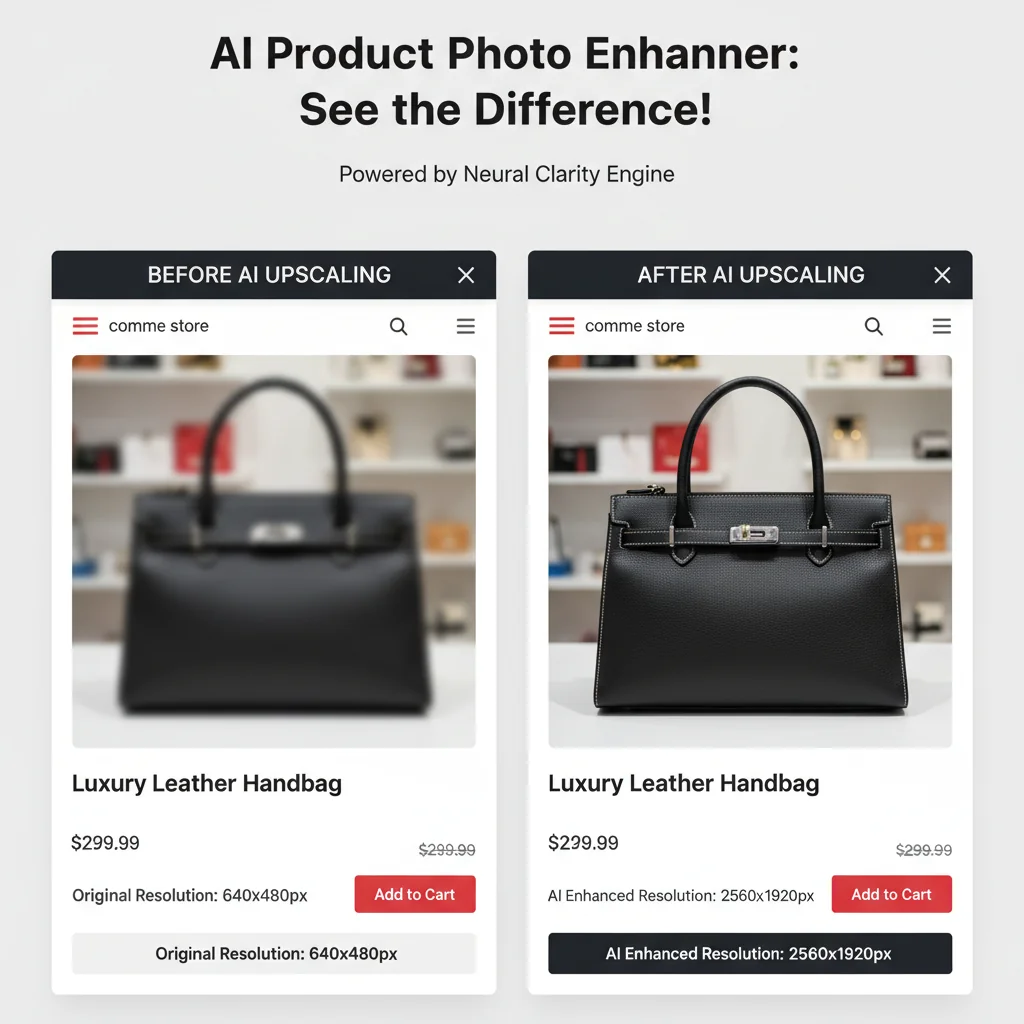
Before and After: What Better Images Change
Sharper images change several things at once: how often shoppers zoom, how long they stay on the product page, how often they add to cart, and how often they return a product that did not match the photo.
Mobile deserves special attention. On smartphones, users pinch-to-zoom constantly. If your image turns into a blurry mess when zoomed, they bounce. High-resolution upscaled images hold their clarity at 3–4x zoom, which is exactly what mobile shoppers need to feel confident buying.
A Full Year of Conversions for $49
Starter Annual: 25 conversions every month, $49 for the whole year. That is about $4.08 a month · Cancel anytime
Get the Annual DealROI Calculation: The Business Case for Upscaling
Here is the math for a hypothetical store.
The Scenario
- Monthly visitors: 10,000
- Current conversion rate: 2.1%
- Average order value (AOV): $45
- Current monthly revenue: 10,000 × 0.021 × $45 = $9,450
After Upscaling (Conservative 25% CR Improvement)
- New conversion rate: 2.63%
- New monthly revenue: 10,000 × 0.0263 × $45 = $11,835
- Monthly revenue increase: $2,385
- Annual revenue increase: $28,620
The Cost
- AI upscaling tool: budget up to ~$50/month (VectoSolve plans start at $7.99/month)
- Time investment: ~4 hours for a 100-product catalog (batch processing)
- Total annual cost: $600 + 4 hours of labor
Bottom line: In this scenario, every $1 spent on image upscaling brings back $40–50 in additional revenue over 12 months. That's a 4,000–5,000% ROI.
And this calculation is conservative. It doesn't account for the compounding effect of better images on your search ranking (both marketplace search and Google Shopping), the reduction in returns, or the improved brand perception that drives repeat purchases.
Step-by-Step Workflow for Product Photo Upscaling
Here's a practical process for onboarding a new product line or refreshing an existing catalog:
Step 1: Audit Your Current Images
Before upscaling anything, take stock of what you have. For each product, check:
- Current resolution (right-click → Properties on Windows, Get Info on Mac)
- Aspect ratio — is it consistent across your catalog?
- Quality issues — noise, compression artifacts, color accuracy
- Compliance — does it meet your platform's current requirements?
A simple spreadsheet works: SKU, current dimensions, target dimensions, priority score (based on traffic and revenue).
Step 2: Prioritize by Revenue Impact
Don't upscale everything at once. Start with your top 20% of products by revenue. In most catalogs, these account for 80% of sales (Pareto principle). Sort your products by monthly revenue and work from the top down.
Step 3: Prepare Source Images
Before feeding images into an upscaler, do basic cleanup:
- Remove compression artifacts if visible (slight denoise)
- Color correct to ensure accurate white balance
- Crop consistently across all products in a category
- Save as PNG (lossless) before upscaling — never upscale a heavily compressed JPEG
Step 4: Upscale with AI
Use VectoSolve's image upscaler to bring your images to the target resolution. Check the result closely on:
- Fine text on packaging (ingredient lists, labels)
- Fabric textures and weave patterns
- Metallic reflections and glossy surfaces
- Transparent and translucent materials
For most e-commerce use cases, 2x or 4x upscaling hits the sweet spot. A 1000px image becomes 2000px (2x) or 4000px (4x) — both well above every marketplace's requirements.
Step 5: Post-Process and Optimize
After upscaling:
- Sharpen slightly (unsharp mask at 0.3–0.5px radius)
- Export as JPEG at 85–92% quality for web use
- Generate WebP variants for Shopify and modern browsers (30% smaller files)
- Create platform-specific crops (square for Amazon, 5:4 for Etsy)
- Compress with a tool like TinyPNG to keep file sizes under 500 KB
Step 6: A/B Test and Measure
Don't just upload and forget. Run proper A/B tests:
- Use Amazon's Manage Your Experiments for A+ Content images
- On Shopify, use apps like Neat A/B Testing or Google Optimize
- Track conversion rate, add-to-cart rate, and bounce rate for 2–4 weeks
- Document results per product category — some niches benefit more than others
Pro Tip: Lifestyle images often benefit more from upscaling than white-background hero shots. The added detail in lifestyle contexts (textures, environments, human elements) creates a stronger emotional connection with buyers.
Common Problems and Solutions
Here are the most frequent image upscaling problems and how to fix them:
Problem: Upscaled Images Look "Plasticky" or Over-Smoothed
Cause: Generic upscalers trained on faces or landscapes don't understand product photography. They over-smooth textures.
Solution: Use an upscaler built to preserve fine detail, such as VectoSolve's. If you notice smoothing, try upscaling at 2x instead of 4x — two passes of 2x often outperform a single 4x pass.
Problem: Text on Packaging Becomes Unreadable
Cause: The AI model hallucinates characters when the source text is too small or blurry.
Solution: For products with important label text, photograph the label separately at macro distance. Upscale the product shot and the label shot independently, then composite them in your image editor.
Problem: Color Shifts After Upscaling
Cause: Some upscalers convert color spaces or apply auto-enhancement.
Solution: Always work in sRGB color space. Compare the upscaled output against the original at 100% zoom. If colors shifted, apply the original's color profile to the upscaled version in Photoshop (Edit → Assign Profile).
Problem: File Sizes Are Too Large After Upscaling
Cause: A 4x upscale of a 1MB JPEG can produce a 15MB+ file.
Solution: Export at JPEG quality 88 (the sweet spot between quality and size). Use WebP where supported. For Amazon, stay under 10MB. For Shopify, aim for under 500KB per image for optimal page speed.
Problem: Inconsistent Quality Across Product Line
Cause: Source images come from different cameras, lighting setups, or suppliers.
Solution: Before upscaling, normalize your source images: same white balance (5500K daylight), same exposure level, same background treatment. Then upscale as a batch. Consistency matters as much as resolution.
Free SVG Tools for Crafters
Design Checker · Color Separator · Mat Preview · Offset Generator · Text to SVG
Check Your SVG FreeThe Competitive Edge You're Leaving on the Table
Here's the opportunity: most of your competitors are still using mediocre images. A 2024 analysis of the top 10,000 Amazon listings found that 43% of them had main images below the recommended 2000px threshold. On Etsy, it's even worse — over 60% of listings don't meet the 2000px minimum.
This means that if you systematically upscale your product photos to 2000px+, you're instantly in the visual top tier of your category. The zoom works. The detail is there. The customer feels confident.
Market reality: Image quality is one of the few remaining competitive advantages that's both cheap to acquire and hard for competitors to notice you've implemented. They'll see your sales climbing but won't immediately know why. By the time they figure it out and catch up, you've already built the review velocity and organic ranking advantage.
Start Upscaling Your Product Photos Today
The math is clear, the data is compelling, and the process is straightforward. Every day you run your store with sub-par product images is a day you're leaving money on the table.
Try VectoSolve's AI image upscaler — upload a product photo right now and see the difference for yourself in a free watermarked preview, no account required.
Your products deserve to be seen in their best light. Your customers are zooming in, scrutinizing every detail, making split-second buying decisions based on what they see. Give them something worth buying.
| Platform | Min Image Size | Recommended Size | Zoom Required? |
|---|---|---|---|
| Amazon | 1000x1000 px | 2000x2000 px | Yes — zoom triggers at 1000px+ |
| Shopify | 800x800 px | 2048x2048 px | Theme dependent |
| Etsy | 2000x2000 px | 2700x2700 px | Yes — built-in zoom |
| eBay | 500x500 px | 1600x1600 px | Yes — zoom at 800px+ |
| Walmart Marketplace | 1000x1000 px | 2000x2000 px | Yes |