
VectoSolve API 튜토리얼: 개발자를 위한 이미지 벡터화 자동화
VectoSolve API를 애플리케이션에 통합하는 방법을 알아보세요. Node.js, Python, PHP 코드 예제와 자동화 워크플로우를 포함한 완전한 가이드.
Founder of VectoSolve
Self-taught developer, founder and sole developer of VectoSolve since 2024. He builds the conversion engine and the cutting, embroidery and 3D printing exports.
How this article was made: drafted with AI assistance, then edited and fact-checked before publication. About the author
Key Takeaways
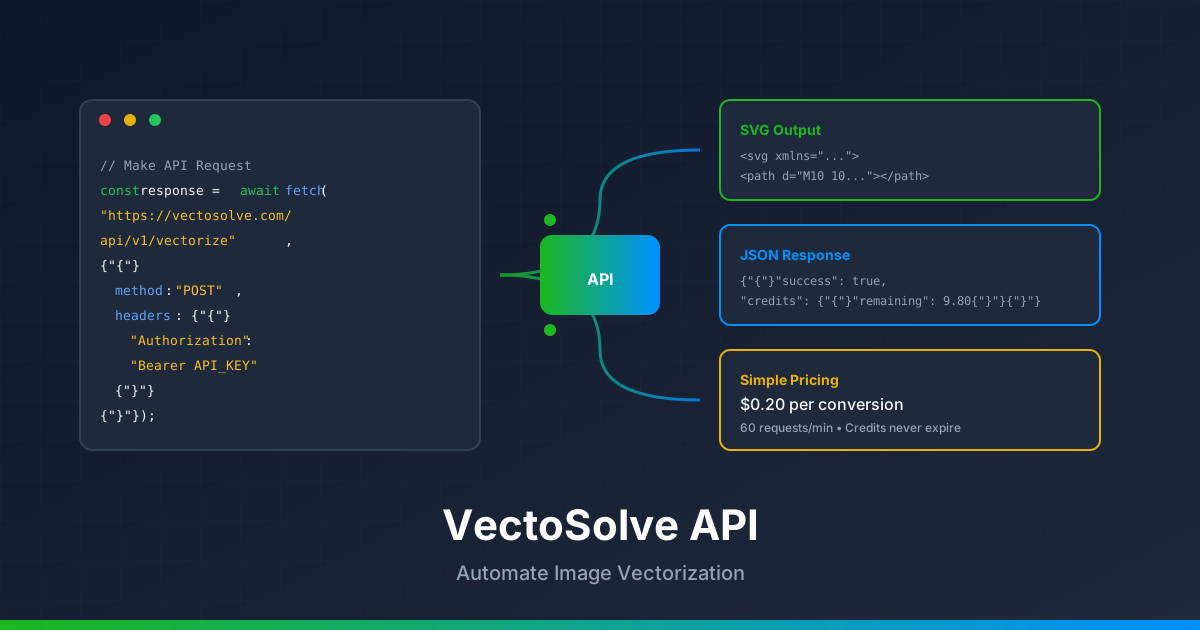
- VectoSolve API는 래스터 이미지를 프로그래밍 방식으로 깨끗한 SVG로 변환합니다 — 변환당 $0.20 (크레딧은 만료되지 않음)
-
간단한 REST 엔드포인트:
POST https://vectosolve.com/api/v1/vectorize에 Bearer 토큰 인증과 multipart form-data -
벡터화 전 배경을 자동 제거하려면 추가 $0.07에
removeBackground=true추가 - 속도 제한은 분당 60 요청 — 대규모 작업에는 지수 백오프와 배치 큐 사용
- n8n, Zapier, AI 에이전트 플랫폼과 통합하여 완전 자동화된 벡터화 워크플로우 구현

SaaS 제품을 구축하든, 디자인 워크플로우를 자동화하든, 수천 개의 이미지를 처리하든, VectoSolve API를 사용하면 래스터 이미지를 프로그래밍 방식으로 깨끗한 SVG 벡터로 변환할 수 있습니다. 이 가이드는 첫 API 호출부터 고급 통합까지 모든 것을 다룹니다.
왜 VectoSolve API를 사용해야 할까요?
수동 이미지 변환은 확장되지 않습니다. VectoSolve API는 다음을 가능하게 합니다:
- 배치 처리 — 수백 개의 이미지를 자동 변환
- SaaS 통합 — 제품에 벡터화 기능 추가
- 워크플로우 자동화 — n8n, Zapier 또는 OpenClaw와 연결
- 일관된 품질 — 매번 동일한 AI 기반 결과
시작하기
1단계: API 키 생성
API 키 대시보드로 이동하여 "새 키 만들기"를 클릭하세요. "프로덕션" 또는 "테스트"와 같은 설명적인 이름을 지정하세요.
중요: API 키를 즉시 복사하세요 — 보안상 다시 표시되지 않습니다.
2단계: 크레딧 추가
각 API 변환 비용은 $0.20입니다. 가격 페이지에서 구독하세요. 크레딧은 만료되지 않으니 필요한 만큼 구매하세요.
3단계: 첫 요청 보내기
API 엔드포인트는 이미지를 form-data로 포함한 POST 요청을 수락합니다:
POST https://vectosolve.com/api/v1/vectorize
Authorization: Bearer YOUR_API_KEY
Content-Type: multipart/form-data
Pro Tip: 통합을 구축하기 전에 간단한 cURL 명령으로 API 키를 테스트하세요. 키가 유효한지, 크레딧이 있는지, 환경에서 엔드포인트에 접근 가능한지 확인할 수 있습니다. 10초면 되고 몇 시간의 디버깅을 절약합니다.
코드 예제
cURL
curl -X POST https://vectosolve.com/api/v1/vectorize \
  -H "Authorization: Bearer YOUR_API_KEY" \
  -F "file=@image.png" \
  -F "removeBackground=false"
Node.js
const FormData = require('form-data');
const fs = require('fs');
const fetch = require('node-fetch');

async function vectorize(imagePath, apiKey) {
  const formData = new FormData();
  formData.append('file', fs.createReadStream(imagePath));
  formData.append('removeBackground', 'false');

  const response = await fetch('https://vectosolve.com/api/v1/vectorize', {
    method: 'POST',
    headers: {
      'Authorization': `Bearer ${apiKey}`,
    },
    body: formData,
  });

  const result = await response.json();

  if (result.success) {
    console.log('SVG URL:', result.svgUrl);
    console.log('Credits remaining:', result.credits.remaining);
    return result.svg;
  } else {
    throw new Error(result.error);
  }
}

// Usage
vectorize('./logo.png', 'YOUR_API_KEY');
Python
import requests

def vectorize(image_path, api_key):
    url = "https://vectosolve.com/api/v1/vectorize"

    with open(image_path, 'rb') as f:
        files = {'file': f}
        data = {'removeBackground': 'false'}
        headers = {'Authorization': f'Bearer {api_key}'}

        response = requests.post(url, files=files, data=data, headers=headers)

    result = response.json()

    if result.get('success'):
        print(f"SVG URL: {result['svgUrl']}")
        print(f"Credits remaining: {result['credits']['remaining']}")
        return result['svg']
    else:
        raise Exception(result.get('error'))

# Usage
svg = vectorize('./logo.png', 'YOUR_API_KEY')
PHP
<?php
function vectorize($imagePath, $apiKey) {
    $url = 'https://vectosolve.com/api/v1/vectorize';

    $curl = curl_init();

    $postFields = [
        'file' => new CURLFile($imagePath),
        'removeBackground' => 'false'
    ];

    curl_setopt_array($curl, [
        CURLOPT_URL => $url,
        CURLOPT_RETURNTRANSFER => true,
        CURLOPT_POST => true,
        CURLOPT_POSTFIELDS => $postFields,
        CURLOPT_HTTPHEADER => [
            'Authorization: Bearer ' . $apiKey
        ]
    ]);

    $response = curl_exec($curl);
    curl_close($curl);

    $result = json_decode($response, true);

    if ($result['success']) {
        echo "SVG URL: " . $result['svgUrl'] . "\n";
        return $result['svg'];
    } else {
        throw new Exception($result['error']);
    }
}

// Usage
$svg = vectorize('./logo.png', 'YOUR_API_KEY');
?>
A Full Year of Conversions for $49
Starter Annual: 25 conversions every month, $49 for the whole year. That is about $4.08 a month · Cancel anytime
Get the Annual DealAPI 응답 형식
성공 응답은 다음과 같습니다:
{
  "success": true,
  "svg": "<svg xmlns=\"http://www.w3.org/2000/svg\"...>",
  "svgUrl": "https://vectosolve.com/api/files/abc123.svg",
  "backgroundRemoved": false,
  "credits": {
    "cost": 0.20,
    "remaining": 9.80
  }
}
오류 처리
API는 표준 HTTP 상태 코드를 반환합니다:
| 코드 | 의미 | 해결책 |
|---|---|---|
| 401 | 잘못된 API 키 | Authorization 헤더 확인 |
| 402 | 크레딧 부족 | 크레딧 추가 구매 |
| 403 | 구독 필요 | 플랜 업그레이드 |
| 429 | 속도 제한 초과 | 대기 후 재시도 (60 요청/분) |
| 500 | 서버 오류 | 재시도 또는 지원팀 문의 |
"최고의 API는 방해하지 않는 것입니다. 파일을 업로드하고 SVG를 받으세요 — 설정 불필요, 파라미터 조정 불필요.
고급: 배경 제거
벡터화 전 배경을 자동 제거하려면 removeBackground=true를 추가하세요. 요청당 추가 $0.07이 부과됩니다:
curl -X POST https://vectosolve.com/api/v1/vectorize \
  -H "Authorization: Bearer YOUR_API_KEY" \
  -F "file=@photo.jpg" \
  -F "removeBackground=true"
Free SVG Tools for Crafters
Design Checker · Color Separator · Mat Preview · Offset Generator · Text to SVG
Check Your SVG Free자동화 통합
n8n 워크플로우
n8n은 강력한 워크플로우 자동화 도구입니다. VectoSolve를 통합하려면:
- HTTP Request 노드 추가
- 메소드를 POST로 설정
- URL:
https://vectosolve.com/api/v1/vectorize - 인증: Header Auth
- 헤더 이름:
Authorization - 헤더 값:
Bearer YOUR_API_KEY - 바디 콘텐츠 타입: Form-Data
- 바이너리 입력으로
file파라미터 추가
Zapier
"Webhooks by Zapier"를 사용하여 VectoSolve를 5,000개 이상의 앱과 연결:
- Webhooks by Zapier 액션 추가
- POST 요청 선택
- URL:
https://vectosolve.com/api/v1/vectorize - 헤더 추가:
Authorization: Bearer YOUR_API_KEY - 페이로드 타입: Form
- 트리거에서 파일 필드 매핑
OpenClaw / AI 에이전트
OpenClaw과 같은 AI 자동화 도구:
- VectoSolve 대시보드에서 API 키 생성
- AI 에이전트에 새 HTTP 도구 추가
- 위에 표시된 대로 POST 요청 구성
- JSON 응답을 파싱하여
svg또는svgUrl추출
대용량 배치 작업 (1,000개 이상 이미지)에는 큐 기반 아키텍처를 구현하세요: 변환 요청을 큐에 푸시하고, 속도 제한을 인식하는 워커로 처리 (최대 60/분)하고, 결과를 자체 스토리지에 저장합니다. 이렇게 하면 타임아웃을 방지하고 모든 이미지가 안정적으로 처리됩니다.
속도 제한 및 모범 사례
- 속도 제한: 분당 60 요청
- 최대 파일 크기: 5MB
- 지원 형식: PNG, JPG, JPEG, WEBP, GIF
- 크레딧: 만료 없음
배치 처리 팁:
- 속도 제한에 지수 백오프 구현
- 요청을 큐에 넣고 50개 단위로 배치 처리
- 같은 이미지의 재변환을 방지하기 위해 결과 캐싱
- 대규모 배치 작업에 webhook 사용
자주 묻는 질문
API 비용은?
변환당 $0.20. 배경 제거는 $0.07 추가. 대량 구매로 절약하세요 — 크레딧은 만료되지 않습니다.
어떤 이미지 형식을 지원하나요?
PNG, JPG, JPEG, WEBP, GIF. 최대 파일 크기는 5MB입니다.
크레딧이 만료되나요?
아니요! 구매 후 크레딧은 사용할 때까지 계정에 영구적으로 남습니다.
속도 제한은?
분당 60 요청. 더 높은 제한은 엔터프라이즈 플랜에 대해 문의하세요.
API를 상업 제품에 사용할 수 있나요?
네! VectoSolve API를 상업 애플리케이션, SaaS 제품 또는 클라이언트 프로젝트에 통합할 수 있습니다.
A Full Year of Conversions for $49
Starter Annual: 25 conversions every month, $49 for the whole year. That is about $4.08 a month · Cancel anytime
Get the Annual Deal도움이 필요하신가요?
다음 리소스를 확인하세요:
- API 키 대시보드 — 키 관리 및 사용량 확인
- FAQ — 일반적인 질문에 대한 답변
- 가격 — 월간 및 연간 플랜
시작할 준비가 되셨나요? API 키를 받고 몇 초 만에 첫 이미지를 변환하세요!
| API 파라미터 | 타입 | 기본값 | 설명 |
|---|---|---|---|
| image | File (multipart) | 필수 | PNG, JPG 또는 WebP, 최대 10MB |
| removeBackground | Boolean | false | 벡터화 전 AI 배경 제거 |
| colorMode | String | "color" | "color", "grayscale" 또는 "blackwhite" |
| detailLevel | String | "medium" | 경로 복잡도: "low", "medium" 또는 "high" |
| outputFormat | String | "svg" | 출력 형식: "svg" 또는 "eps" |
출처 및 추가 읽기
- MDN Web Docs — Fetch API — API 통합 예제에서 사용된 multipart form-data HTTP 요청 참조
- Google AI Blog — Image Processing APIs — AI 이미지 처리, REST API 디자인 패턴, 확장 가능한 클라우드 아키텍처에 대한 인사이트
- Smashing Magazine — API Integration — Node.js, Python, 프론트엔드 JavaScript에서 REST API 활용에 대한 개발자 가이드
- W3C SVG 2 Specification — 벡터화 API 응답의 출력 형식을 이해하기 위한 공식 SVG 표준