
VectoSolve Firefox Extension — Convert Any Image to SVG in One Click
The VectoSolve image-to-SVG extension is now available for Firefox. Right-click any image, vectorize it instantly, and download a clean SVG — all without leaving your browser.
Founder of VectoSolve
Self-taught developer, founder and sole developer of VectoSolve since 2024. He builds the conversion engine and the cutting, embroidery and 3D printing exports.
How this article was made: drafted with AI assistance, then edited and fact-checked before publication. About the author
Try it on your own file
Free preview, no signup. Drop an image and see the vector before deciding anything.
VectoSolve Is Now on Firefox
Great news for Firefox users: the VectoSolve browser extension is now officially available on Mozilla Add-ons. If you've ever needed to convert a PNG, JPG, or WebP image into a scalable SVG vector, you can now do it directly from Firefox with a single right-click.
No more downloading images, opening a separate tab, uploading, waiting, and downloading again. The extension brings AI-powered vectorization right into your browsing workflow.
What the Extension Does
The VectoSolve Firefox add-on gives you three ways to convert images to SVG:
1. Right-Click Any Image
Browse the web normally. When you spot an image you want to vectorize, right-click it and select "Vectorize with VectoSolve" from the context menu. The extension sends the image to VectoSolve's AI, converts it to SVG, and downloads the result automatically.
You can also choose "Remove Background + Vectorize" to get a clean, background-free SVG in one step.
2. Drag & Drop in the Popup
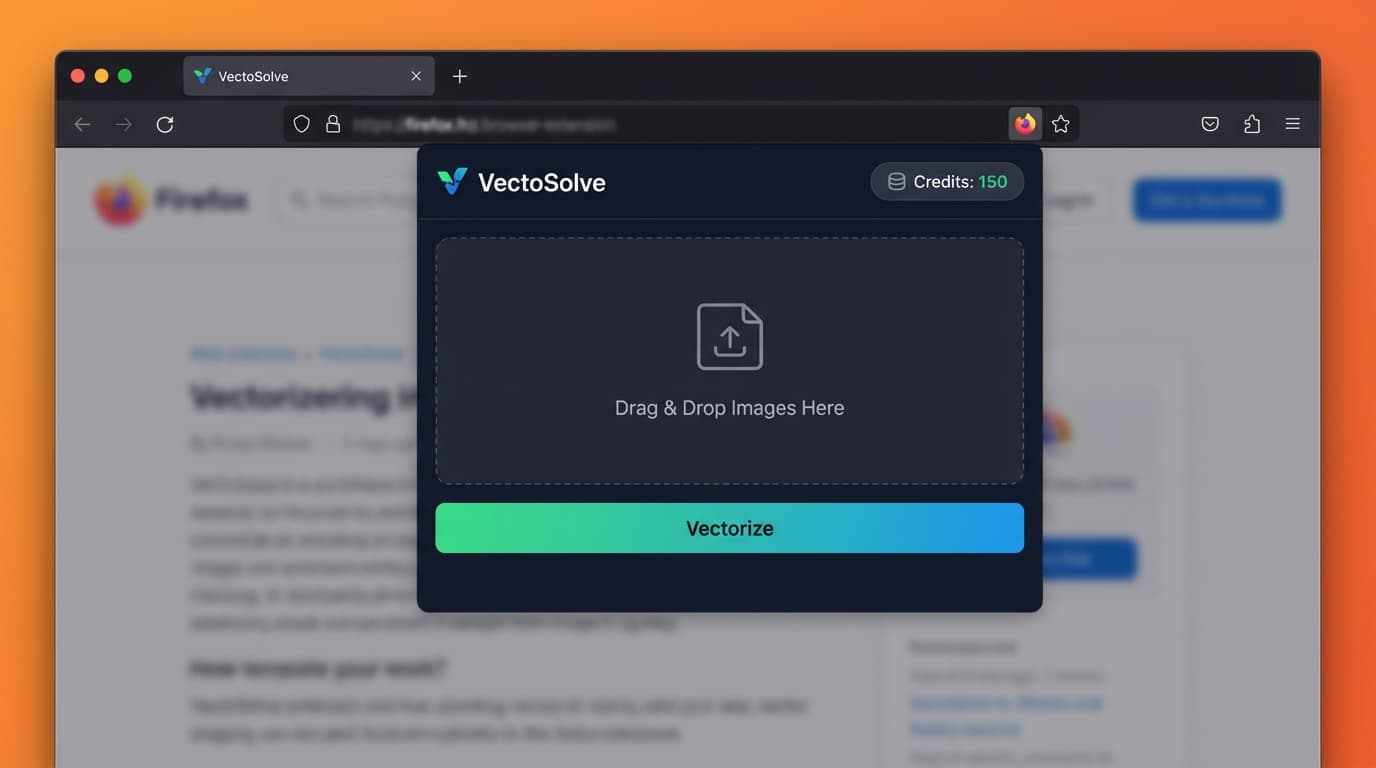
Click the VectoSolve icon in your toolbar to open the popup. Drag any image file from your desktop or file manager into the drop zone. The conversion starts immediately.
3. Screenshot Capture
Need to vectorize something on screen that isn't a standalone image? The extension can capture a screenshot of the current tab and convert it. Useful for grabbing icons from web apps, UI elements, or anything visible on screen.
Works on Canva, Figma, and Google Slides
One of the most popular use cases: you're working in a design tool and need to vectorize a raster image that's part of your project. The extension injects convenient "Vectorize" buttons directly into:
- Canva — vectorize any image in your design
- Figma — convert raster assets to SVG
- Google Slides — turn presentation images into scalable vectors
This integration means you can convert images without ever leaving your design workflow.
A Full Year of Conversions for $49
Starter Annual: 25 conversions every month, $49 for the whole year. That is about $4.08 a month · Cancel anytime
Get the Annual DealHow It Works Under the Hood
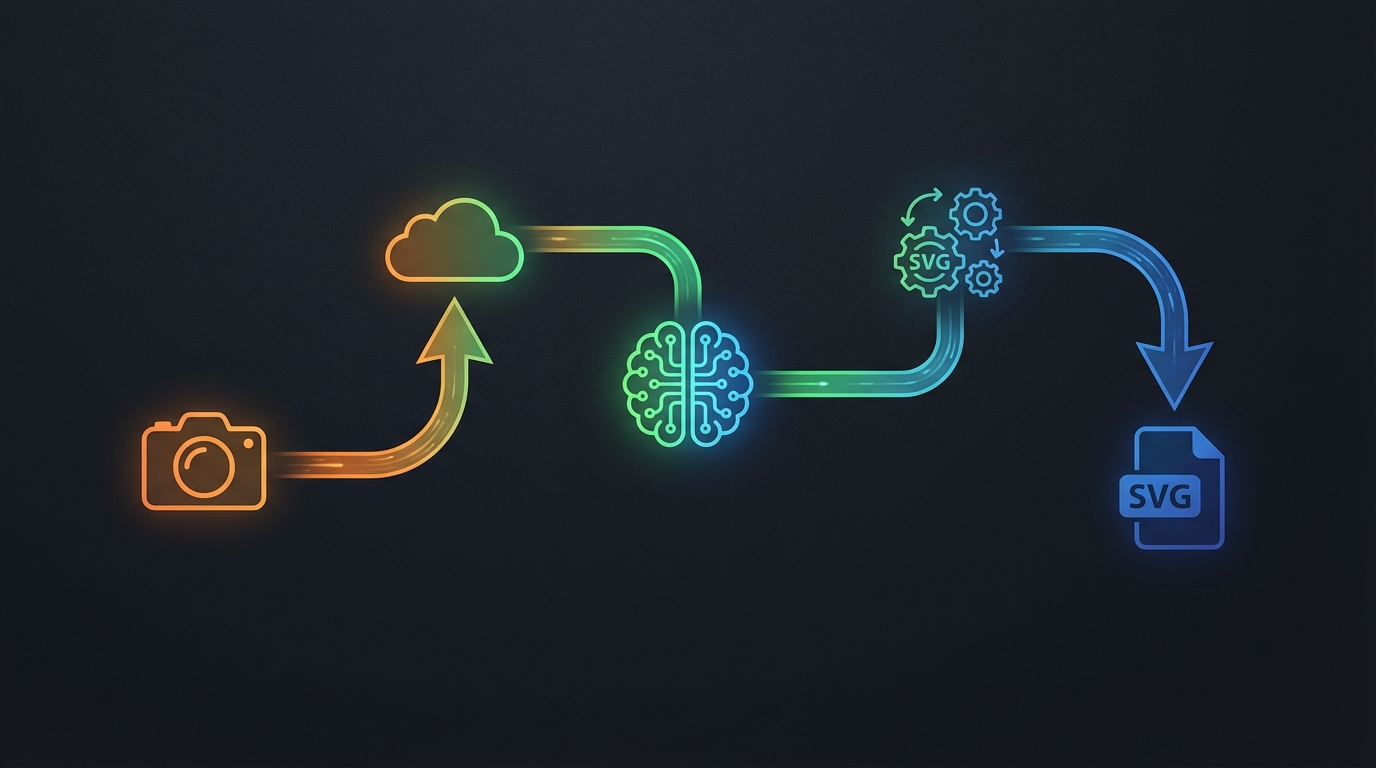
When you right-click an image or drop one into the popup, here's what happens:
- Image capture — the extension grabs the full-resolution image from the page
- Upload — the image is securely sent to VectoSolve's API
- AI vectorization — an AI model converts the raster image to vector paths
- Post-processing — SVGO optimization, color merging, and speckle removal
- Download — the clean SVG file downloads automatically to your computer
The entire process takes 5-15 seconds depending on image complexity.
Pricing — From $7.99 a Month
The extension is completely free to install. Each action uses credits from your plan:
| Action | Cost |
|---|---|
| Vectorize (image to SVG) | 0.20 credits |
| Remove background | 0.07 credits |
| Both (remove BG + vectorize) | 0.27 credits |
Unused credits roll over from one month to the next. Plans start at $7.99 a month for 25 conversions.
Your credit balance is always visible in the extension popup, so you know exactly how many conversions you have left.
Firefox vs Chrome — Same Features, Same Quality
If you already use the VectoSolve Chrome extension, you'll feel right at home. The Firefox version has complete feature parity:
- Right-click context menu with vectorize and remove background options
- Popup with drag & drop and screenshot capture
- Button injection on Canva, Figma, and Google Slides
- Credit balance display and account management
- Batch mode for multiple images
- Same AI vectorization engine and post-processing pipeline
The only technical difference: Chrome uses Manifest V3, while Firefox uses Manifest V2 (Mozilla's standard). From a user perspective, the experience is identical.
Free SVG Tools for Crafters
Design Checker · Color Separator · Mat Preview · Offset Generator · Text to SVG
Check Your SVG FreeWho Is This For?
The extension is built for anyone who regularly needs SVG files:
- Designers — quickly vectorize reference images, logos, and sketches
- Cricut & cutting machine users — convert images to cut-ready SVGs
- Web developers — grab SVG versions of icons and graphics from any site
- Etsy sellers — create SVG products from hand-drawn artwork
- Social media managers — convert brand assets to scalable formats
- Students — vectorize diagrams and illustrations for projects
How to Install
Getting started takes about 30 seconds:
- Visit the Firefox Add-ons page
- Click "Add to Firefox" and confirm the permissions
- Sign in with your VectoSolve account (or create a free one)
- Start vectorizing — right-click any image on the web
That's it. No configuration needed.
What's Next
We're continuing to improve both browser extensions with upcoming features:
- Batch select mode — select multiple images on a page and convert them all at once
- Format options — choose between SVG, PDF, and EPS output
- History panel — view and re-download recent conversions
- Keyboard shortcuts — vectorize even faster with hotkeys
A Full Year of Conversions for $49
Starter Annual: 25 conversions every month, $49 for the whole year. That is about $4.08 a month · Cancel anytime
Get the Annual DealTry It Now
The VectoSolve Firefox extension is available right now on Mozilla Add-ons. Install it for free and start converting images to SVG with a single click.
Already using Chrome? Get the Chrome extension instead.