
Trace a scanned drawing into Rhino 8 curves: one spline per stroke with VectoSolveTrace
Rhino has no raster-to-curve command and the free Vectorize plug-in traces outlines. VectoSolveTrace does the centerline pass: one editable SPLINE per stroke, imported as a millimetre DXF into the open document.
Founder of VectoSolve
Self-taught developer, founder and sole developer of VectoSolve since 2024. He builds the conversion engine and the cutting, embroidery and 3D printing exports.
How this article was made: drafted with AI assistance, then edited and fact-checked before publication. About the author
Try it on your own file
Free preview, no signup. Drop an image and see the vector before deciding anything.
The problem: outlines are the wrong geometry for a drawing
Rhino has no raster-to-curve command. The usual answer is the free Vectorize plug-in from McNeel, and for logos and filled shapes it is the right answer: it traces the outline of every dark region with Potrace, the same engine Inkscape uses. On a scanned drawing that geometry is wrong by construction. A pencil line 0.5 mm wide becomes two curves 0.5 mm apart plus two tiny caps. A lines plan, a floor plan, a hand sketch or a patent drawing comes back as a field of thin closed loops that nobody can fair, offset, extrude or dimension. You do not want the edge of the ink; you want the line the draughtsman drew.
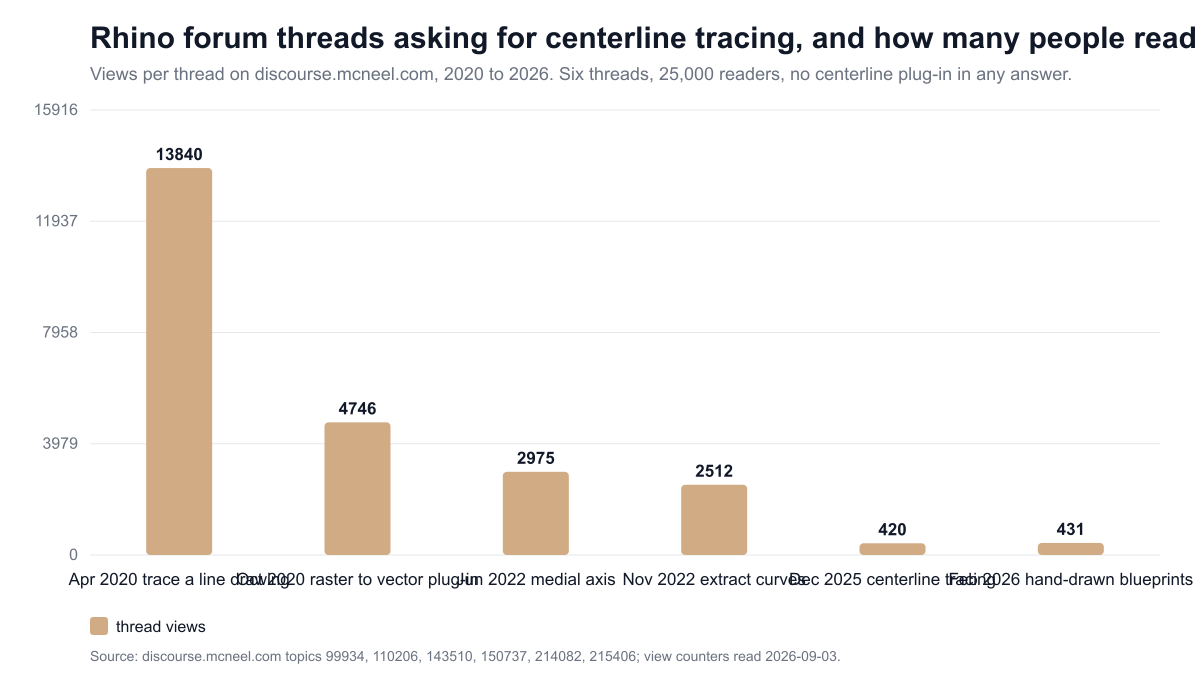
Rhino users have been saying so for six years. Six threads on the McNeel forum ask for exactly this, and none of the answers points to a plug-in that does it. Their view counters, read on 2026-09-03: "How to trace a line drawing image to be a real line vector" (April 2020) 13,840 views and 16 replies, one of which concludes that the best tool for the job is not an automated one; "Raster to Vector Conversion Plug In" (October 2020) 4,746 views and 35 replies, the thread in which users asked for a replacement after the author of the old Trace plug-in passed away, and from which Vectorize was born; "Medial Axis from multiple closed curves, middle of double line" (June 2022) 2,975 views; "Extract Curves from Raster Image" (November 2022) 2,512 views; "Vectorize: centerline tracing" (December 2025) 420 views and one reply, "each converted line is doubled"; "I love Rhino, but hand-drawn blueprints are still my kryptonite" (February 2026) 431 views and 9 replies, "hours of manual tracing... old scanned archive plans". The forum counts 130,882 members and 3,998 active in the last 30 days.
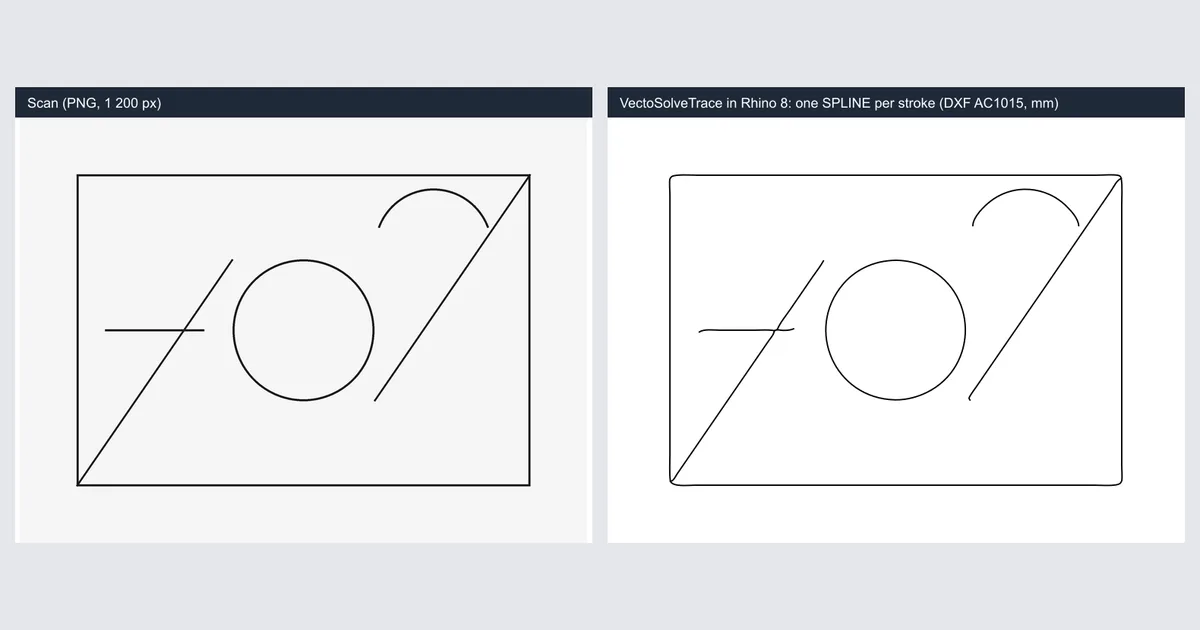
VectoSolveTrace is a Rhino 8 command that does the centerline pass: one editable curve down the middle of each stroke, delivered as SPLINE entities in an AutoCAD 2000 DXF and imported into the open document. This article is the engineering report: what it does, how it was measured, where it broke while we built it, and what it will not do.
What Vectorize does well, and where it stops
Vectorize (Dale Fugier, McNeel) is free, GPL v2, and popular: 68,729 downloads and 108 five-star votes on food4Rhino as of 2026-09-03, about 38 downloads a day since October 2020. Rhino 7 and 8 users install it through PackageManager. It is the tool to reach for when the image is a logo, a silhouette or a filled shape, because the outline is the geometry you want.
It stops where the input is a stroke. Potrace has no notion of a stroke's middle; it traces the boundary between dark and light. Every line becomes a ribbon, every crossing becomes a small polygon, and the cleanup is the manual tracing the forum threads describe.
How centerline tracing works, and two bugs we found on the way
The pipeline behind VectoSolveTrace runs on our servers and is the same one the website's centerline page uses:
- Threshold. The image is flattened on white, converted to grey, and split into ink and paper with Otsu's method, which picks the grey level that best separates the two populations of the histogram.
- Thin. The ink mask is eroded to a one-pixel skeleton (Zhang-Suen thinning) and traced into polylines with junction awareness, using the skeleton-tracing-js library.
- Smooth, then fit. The pixel staircase is smoothed with a short moving average, then each polyline is fitted with cubic Bézier curves. The order matters: fitting first and smoothing after rounds the corners; smoothing first and fitting after keeps a 90 degree corner sharp and turns a 400-point fair line into five cubics with 0.17 px of deviation.
- Write. Each Bézier chain becomes one SPLINE entity in the DXF (details below).
Two bugs are worth reporting because they explain results you may have seen elsewhere.
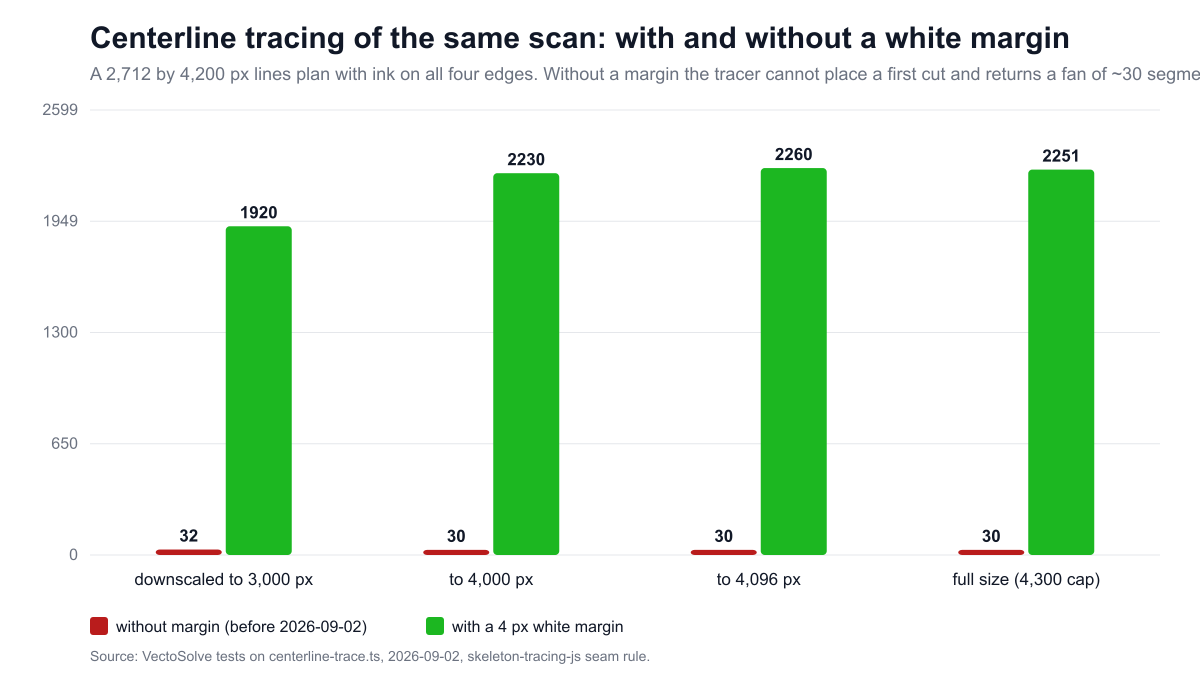
The fan. On 2026-09-02 a naval architect's scan, 2,712 by 4,200 px with the scanner border touching all four edges, traced to about 30 segments radiating from one point instead of the 2,000 lines on the sheet. The cause is a rule inside skeleton-tracing-js: it divides the image recursively along seams, and a seam is only valid if both of its ends are white. Ink on every border leaves no valid seam at the root, the library falls back to treating the whole image as one chunk, and joins every border crossing to the centre. A four-pixel white margin around the mask restores the first seam. Measured on that scan, downscaled to 3,000, 4,000 and 4,096 px, then at full size: 32, 30, 30 and 30 polylines without the margin; 1,920, 2,230, 2,260 and 2,251 with it. The regression test is a framed grid: 1 polyline without margin, 308 with.
The pure black-and-white refusal. On 2026-09-03 the plug-in's own test harness sent a PNG exported from a drawing program, pure black on pure white, and the server refused it as "empty". Otsu's method on a two-level histogram gives a plateau of equally good thresholds; the code kept the first one (zero), and a mask defined as "darker than zero" is empty. Keeping the last threshold of the plateau fixed it. Greyscale scans were never affected because their histograms have no plateau.
A Full Year of Conversions for $49
Starter Annual: 25 conversions every month, $49 for the whole year. That is about $4.08 a month · Cancel anytime
Get the Annual DealInstalling and running the command
- In Rhino 8, run
PackageManager, searchvectosolve, install VectoSolveTrace, restart Rhino. The package is published on McNeel's package server (version 1.0.0, MIT licence); the food4Rhino listing was submitted on 2026-09-03 and follows once approved. - Create a free VectoSolve account and an API key at vectosolve.com/dashboard/api-keys. Trial calls are included, no card needed.
- Open a document in millimetres and run
VectoSolveTrace. - First run only: a text box asks for the key and stores it in
%APPDATA%\VectoSolve\api_key.txt(macOS:~/Library/Application Support/VectoSolve). The key leaves your machine only in the request header to vectosolve.com over HTTPS. - A file dialog: pick the scan (PNG, JPG, WebP or GIF, up to 4 MB, the server cap being 4.5 MB per request).
- A prompt: "Drawing width in millimetres (0 keeps one pixel per millimetre)". Type the real width of the drawing if you know it.
- The command line shows "Uploading (mode centerline)", then "DXF received" with the number of curves, and the curves appear in the document, selected and zoomed. The last line gives the conversions left on the account.
Under the hood the command sends one multipart request to the VectoSolve API with mode=centerline, output_format=dxf, dxf_version=AC1015, units=mm and your width, with an Idempotency-Key header so a retry after a network cut never charges twice. It writes the DXF to a temporary file and runs _-Import on it. When the server answers 422 (the image is not line art), the plug-in explains and offers the outline mode instead. When the key is rejected, it forgets it and asks again.
Preparing a scan: four numbers that decide the result
- Resolution. The tracer downscales anything above 3,000 px on the long side before thinning. A 300 dpi A3 scan is 3,508 px wide and will be reduced by 15 percent; fine lines survive that. A 600 dpi scan gains nothing and uploads slower.
- Threshold. A greyscale scan carries paper texture and pencil pressure. If the result has stray specks, export the scan as pure black on white first (threshold at about 50 percent in any image editor) and trace that.
- Ink ratio. The server refuses images with more than 20 percent ink as "too filled", because a filled shape has no meaningful centerline. The ratio is measured on the source, not on the downscaled copy: reducing a 2,900 px plan once pushed its apparent ink from 14 to 17 percent and tripped the guard, so the check was moved to the original.
- Margin and dashes. The margin is now added automatically, but a scan cropped inside its frame still traces cleaner. Dashed grid lines come out as short curves, which is correct and useless; redraw the grid in Rhino, it is a grid.
A worked example: a 30-year-old lines plan
The scan that exposed the fan bug is a good test because it is ugly in the normal ways: greyscale, border on all sides, a dashed station grid, 30 years of paper. Thresholded to pure ink and thickened slightly, it traced to 2,251 single curves. Exported as SPLINE entities, the DXF was re-read by the reference parser with zero errors and imported into Rhino 8 as curves that snap, offset and fair. End to end, in production on 2026-09-02, the same scan (2,070 curves on that run) took 8.5 seconds. The dashed grid came out dashed and was redrawn in two minutes. The design work, fairing the hull lines and fitting them to stations, stayed with the designer, which is the honest shape of this job.
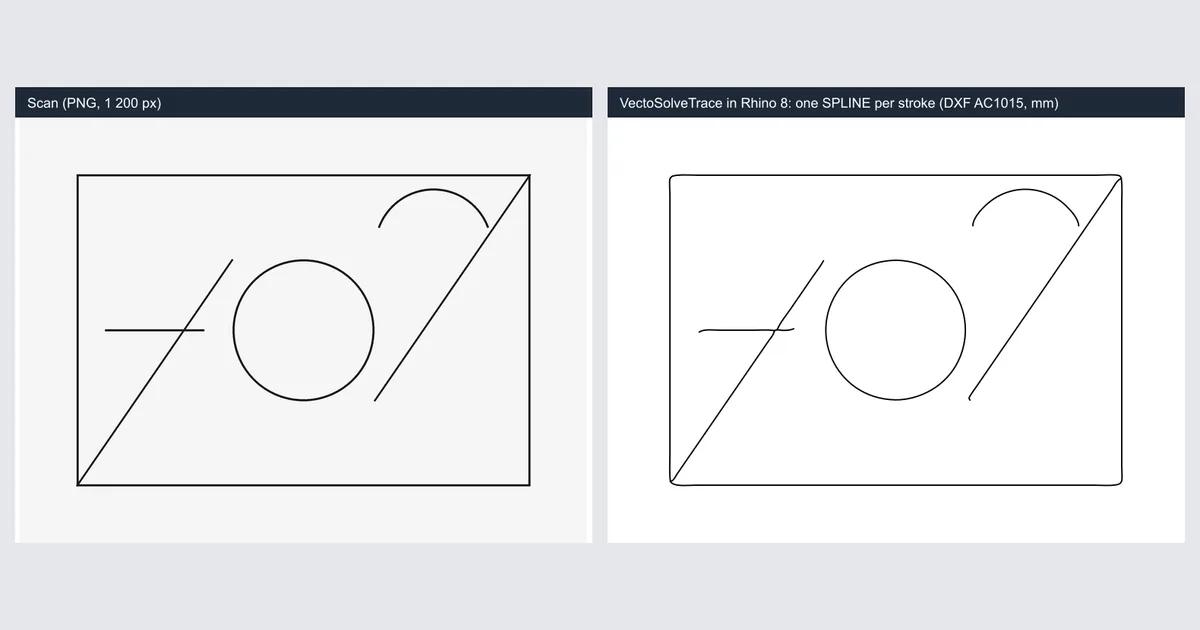
The test drawing shipped with the plug-in is smaller: 1,200 by 900 px, a rectangle, a circle, two diagonals and a short stroke. It traces in 3.4 seconds to 10 SPLINE entities with extents from 21 to 189 mm for a requested width of 210 mm, and a zero-error audit.
Free SVG Tools for Crafters
Design Checker · Color Separator · Mat Preview · Offset Generator · Text to SVG
Check Your SVG FreeDXF internals: why the file opens, and what is inside
Rhino reads two DXF flavours from VectoSolve.
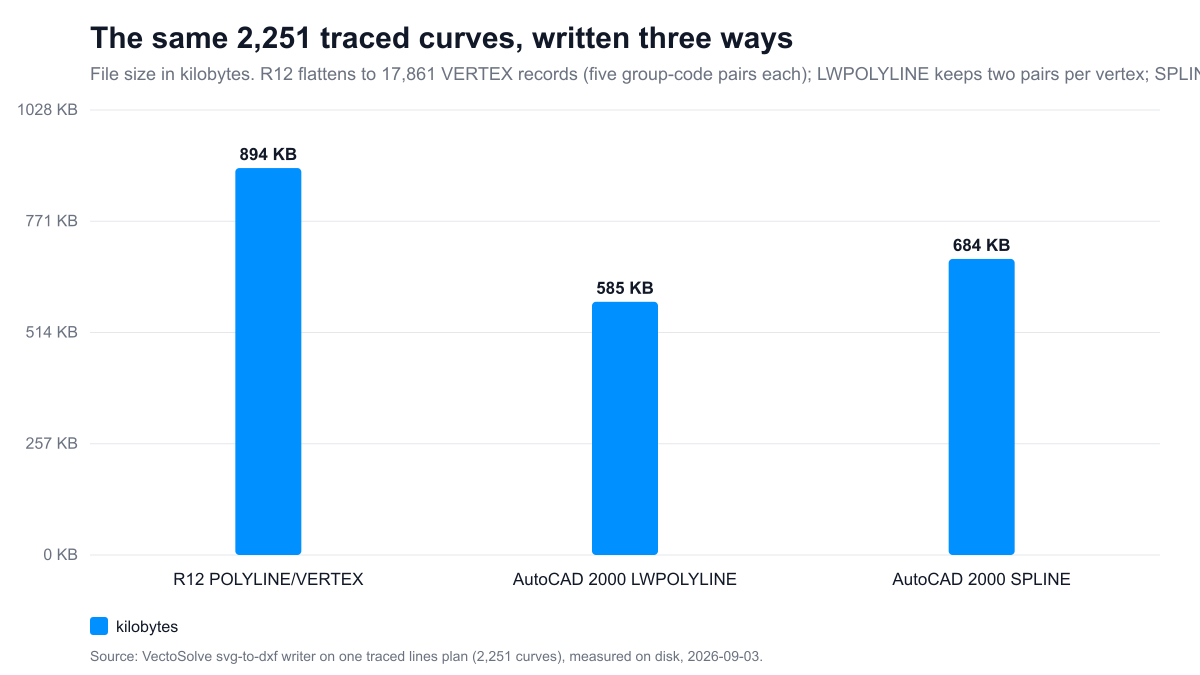
R12 (AC1009) is the 1992 format: POLYLINE and VERTEX records, no handles, no object dictionary. It reads in every CAM package of the last thirty years, and it flattens every curve to vertices. On the 2,251-curve plan above, the R12 export weighs 894 KB and carries 17,861 VERTEX records, five group-code pairs each.
AutoCAD 2000 (AC1015) is what the plug-in uses. It carries LWPOLYLINE entities (two group-code pairs per vertex) and SPLINE entities, on a complete R2000 skeleton: a HANDSEED, a handle on every entity, nine symbol tables, block records, a BLOCKS and an OBJECTS section. The same 2,251 curves weigh 585 KB as LWPOLYLINE and 684 KB as SPLINE; splines are larger than flattened polylines here because each cubic keeps its control points.
The skeleton is not a detail. On 2026-08-25 Rhino 8 refused a DXF from an earlier version of our AutoCAD 2000 writer with "Opendesign error: missing symbol table": the file had one table and no handles, and lenient readers had hidden that for months. The rewritten writer emits the full structure, and every AutoCAD 2000 export is now re-read by the ezdxf 1.4.4 reference parser, in strict mode with an audit, inside the test suite: zero errors on five option combinations and on 15 of 16 real customer files, the sixteenth being an empty-geometry edge case fixed the same day. The test is the guarantee; a sentence on a web page is not.
How a stroke becomes a SPLINE. Each traced stroke is a chain of N cubic Béziers. A chain of cubics is exactly a clamped B-spline of degree 3: the control points are the Bézier control points with shared endpoints written once (3N+1 points), and the knot vector repeats each interior value three times, [0,0,0,0, 1,1,1, 2,2,2, ..., N,N,N,N], so the knot count equals the control count plus four. In the DXF that is group code 70 = 8 (planar) or 9 (closed and planar), 71 = 3 (degree), 72 = knot count, 73 = control point count, 74 = 0 (no fit points), one 40 per knot and 10/20/30 per control point. Every span of the spline is the original cubic, an identity rather than an approximation, which is why the curve you edit in Rhino has a handful of control points instead of hundreds of vertices.
Vectorize versus VectoSolveTrace, side by side
| Vectorize (McNeel, free) | VectoSolveTrace | |
|---|---|---|
| Method | Outline tracing (Potrace) | Centerline tracing (skeleton of each stroke) |
| A pencil line becomes | Two curves plus caps | One curve |
| Best for | Logos, filled shapes, silhouettes | Scanned plans, sketches, single-line lettering, technical drawings |
| Photos and fills | Traced as outlines | Refused with an explanation, not charged; outline mode offered instead |
| Output | Rhino curves in the document | DXF AC1015 with SPLINE entities, imported into the document |
| Units | Document units | Millimetres, the width you type |
| Runs | Locally | Online, through the VectoSolve API |
| Price | Free | Free plug-in; one conversion per run on a VectoSolve account |
Both have a place. Trace a logo with Vectorize. Trace a lines plan with VectoSolveTrace, then fair the curves in Rhino.
What it will not do
Centerline tracing is for line drawings. On a photo, a filled logo or a shaded rendering the server refuses the job and does not charge; the plug-in then offers the outline mode, which gives the same closed polylines Vectorize would. It does not fit curves to a station grid, fair a hull, or decide which of two crossing lines continues where; that is design work on top of the traced curves. And it does not read TIFF: export the scan as PNG first. For reference, the commercial raster-to-vector tools aimed at CAD start at $89 a month (Scan2CAD, vendor pricing read 2026-09-02); the plug-in is free and each run costs one conversion.
A Full Year of Conversions for $49
Starter Annual: 25 conversions every month, $49 for the whole year. That is about $4.08 a month · Cancel anytime
Get the Annual DealPricing
The plug-in is free and open source (MIT). Each run uses one conversion on your VectoSolve account, like a conversion on the website: $7.99 a month for 25 conversions, or the annual plan at $49 for 300 conversions a year. A refused image costs nothing.
Where VectoSolve runs
- Rhino 8:
PackageManager, searchvectosolve. Windows and Mac, one Python 3 command. - Web: centerline tracing without a plug-in, and the scan to CAD page.
- Image to DXF for laser and CNC, with the free DXF checker.
- Chrome and Firefox: the VectoSolve extension and the Firefox add-on.
- ChatGPT: the VectoSolve app, under review for OpenAI's app directory (demo).
- Agents and editors: @vectosolve/mcp on npm.
- REST API: vectosolve.com/developers. The plug-in is a thin client on one call,
POST /api/v1/vectorizewithmode=centerline,output_format=dxf,dxf_version=AC1015; anything Rhino can script can call it.
Frequently asked questions
Does it work in Rhino 7?
No. The command is a Python 3 script packaged for Rhino 8. On Rhino 7, use the web page and import the DXF.
Does it need Grasshopper?
No. It is a plain Rhino command.
Can I get polylines instead of splines?
Yes. Run the same image on the website in Laser or Standard mode with DXF R12 output, or use Rhino's Convert on the splines.
How accurate is the centerline?
On a clean 300 dpi scan the curve sits within a pixel of the drawn line; the Bézier fit adds at most 0.8 px of deviation by design. On a blurred scan the skeleton follows the blur, so threshold first.
Will the file open in AutoCAD, Fusion or SolidWorks?
It carries the full AutoCAD 2000 structure and is re-read by a reference parser before release. Rhino is the host we test in; other CAD programs read the same standard, and we would rather you test than take our word.
What about ink on the border?
Handled since 2026-09-02 by an automatic margin; a scan cropped inside its frame still gives the cleanest curves.
Why one conversion per run?
The centerline pass runs on our servers, like the website. A refusal is free; a successful trace is one conversion.
Free SVG Tools for Crafters
Design Checker · Color Separator · Mat Preview · Offset Generator · Text to SVG
Check Your SVG FreeSources
- McNeel forum, discourse.mcneel.com, topics 99934 (April 2020), 110206 (October 2020), 143510 (June 2022), 150737 (November 2022), 214082 (December 2025), 215406 (February 2026); view and reply counters read 2026-09-03; forum size from about.json, read 2026-09-02.
- Vectorize plug-in page on food4Rhino: food4rhino.com/en/app/vectorize, downloads and votes read 2026-09-03.
- Rhino package manager documentation: developer.rhino3d.com/guides/yak.
- skeleton-tracing-js: github.com/LingDong-/skeleton-tracing.
- Potrace: potrace.sourceforge.net.
- ezdxf, the DXF reference library used in VectoSolve's test suite: ezdxf.mozman.at.
- VectoSolve measurements: fan test and margin fix, DXF sizes, production timings, 2026-09-02 and 2026-09-03.
- Scan2CAD pricing, vendor site, read 2026-09-02.