
ChatGPT image to SVG or DXF: how to vectorize an AI-generated picture
A ChatGPT image is a PNG. Here is how to turn it into a clean SVG for design tools or a DXF for laser cutters and CAD, on the web or directly inside ChatGPT with the VectoSolve app.
Founder of VectoSolve
Self-taught developer, founder and sole developer of VectoSolve since 2024. He builds the conversion engine and the cutting, embroidery and 3D printing exports.
How this article was made: drafted with AI assistance, then edited and fact-checked before publication. About the author
Try it on your own file
Free preview, no signup. Drop an image and see the vector before deciding anything.
A generated picture is not a design file
Ask ChatGPT for a logo, a sticker, a mascot or a monogram and you get a PNG. It looks finished on screen. It is not finished for anything that has to cut, embroider, engrave or print at size. A Cricut follows cut paths; a laser cutter needs closed contours; an embroidery digitizer wants shapes with edges; a print shop asks for a vector file the second you say "banner". The image model behind ChatGPT renders pixels, and so does every other image model on the market. OpenAI confirmed the name of its next model family, Astra, in August 2026, and nothing about it is public yet; it will render pixels too. The step between "generated" and "usable" is vectorization, and this article is a field report on doing it well, measured on real traffic.
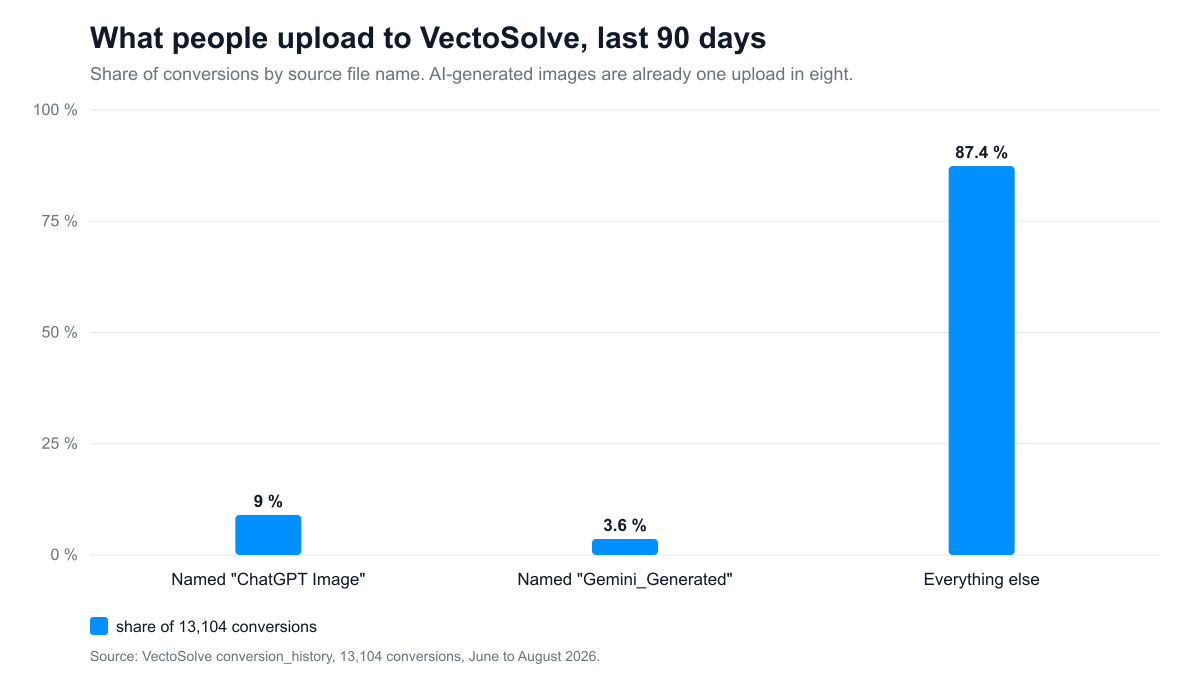
The traffic is not hypothetical. Over the last 90 days (June to August 2026), 13,104 images went through VectoSolve. 1,184 of them carried a file name starting with "ChatGPT Image" and 477 with "Gemini_Generated": 12.7 percent of everything we converted was born in a chat window. Source: our conversion history table, file names, read on 2026-09-02.
What ChatGPT hands you, and why asking it for an SVG does not work
Three facts about the file you download from a ChatGPT image:
- It is a raster PNG, usually 1024 px on the long side, sometimes 1536 or 2048 if you asked. There is no path data inside it, only colored pixels.
- The edges are anti-aliased: a "solid" red shape is bordered by a ring of pink, then white. A tracer has to decide where the shape ends.
- Backgrounds are often a near-white gradient rather than pure white, and shadows are frequent unless you forbid them.
You can ask ChatGPT to "convert this to SVG". For a circle or a simple icon it will write SVG code and the result is fine. For anything it drew as an image, it cannot: the language model does not see the geometry, it sees a picture, and it produces a new drawing that resembles the old one. Details move, proportions drift, the approved logo becomes a cousin of itself. When the image is the thing that was approved, the only faithful route is tracing the actual pixels.
The demand picture, in three charts
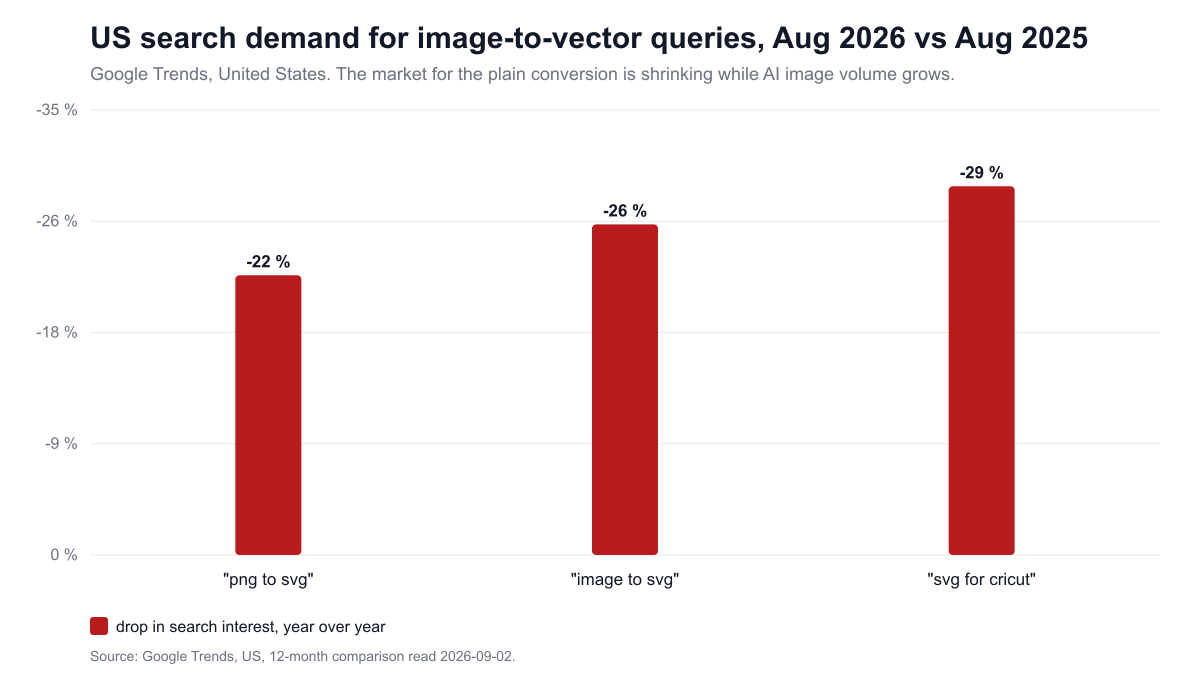
Search demand for the plain conversion is shrinking. Google Trends for the United States, August 2026 against August 2025: "png to svg" down 22 percent, "image to svg" down 26 percent, "svg for cricut" down 29 percent (read 2026-09-02). People are generating more and searching less; the conversion is becoming a step inside another tool rather than a destination.
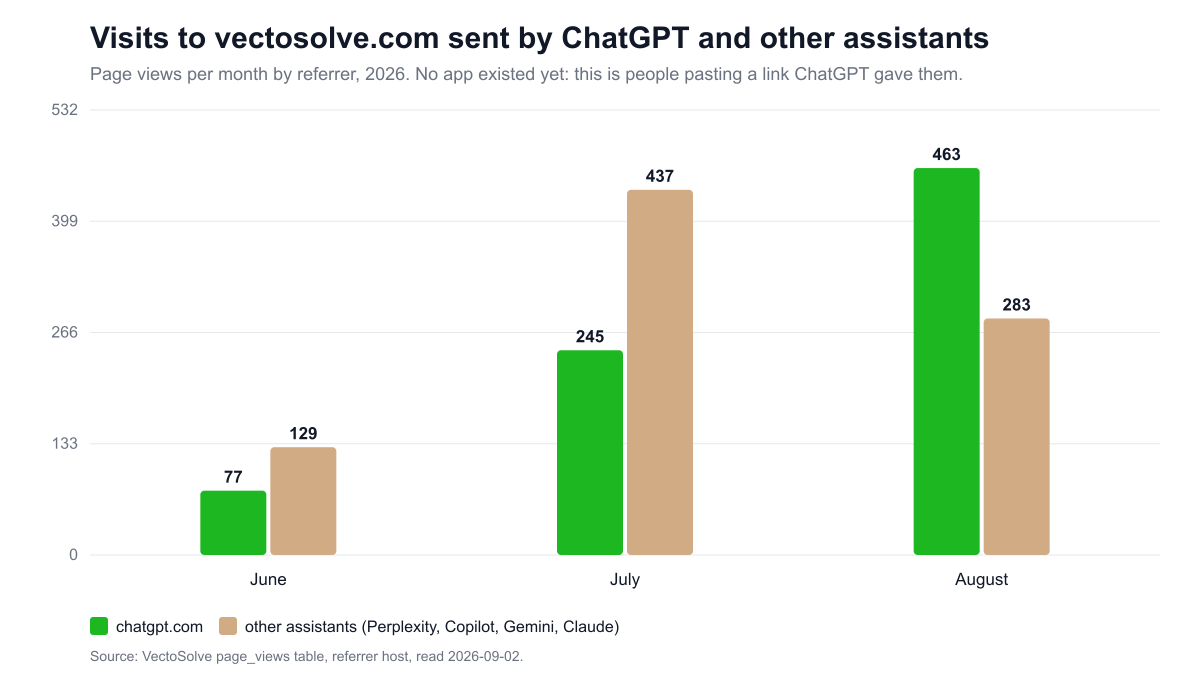
Meanwhile the traffic that assistants send us grows without any effort on our side. Views of vectosolve.com with chatgpt.com as referrer: 77 in June, 245 in July, 463 in August 2026. Other assistants combined (Perplexity, Copilot, Gemini, Claude): 129, 437, 283. Over 90 days that is 1,673 views from assistants against 98,361 from Google, 1.7 percent of the total, but it is the fastest-growing line in the table, and these are people who already know what they want: ChatGPT told them "you need a vectorizer" and gave them a link.
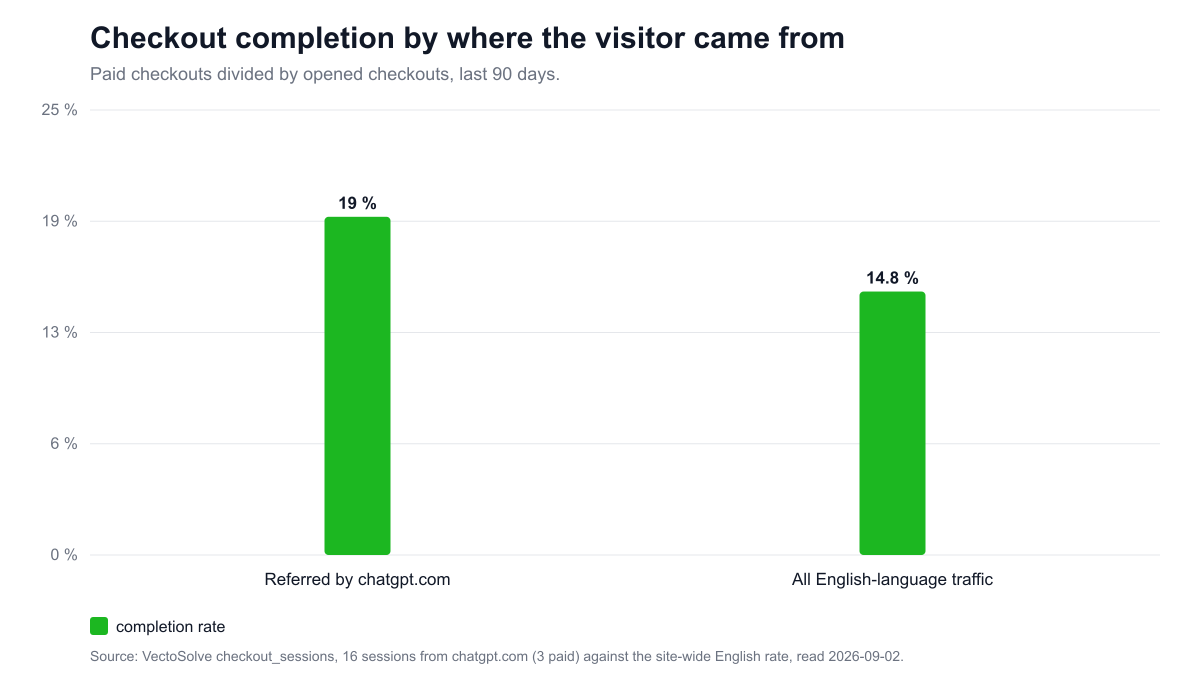
They also buy more often once they arrive. Visitors referred by chatgpt.com opened 16 checkouts in 90 days and paid 3 of them, 19 percent, against 14.8 percent for all English-language traffic. Sixteen sessions is a small sample and we say so; the direction matches what the file names already showed.
One more data point, from the ChatGPT app directory itself, searched on 2026-09-02: "svg", "vectorize", "dxf" and "laser" return no app at all. "vector" returns five unrelated database tools. "logo" returns four logo generators, none of which produces a vector file. Adobe is there with six apps, Canva is there; Vectorizer and Recraft are not. The shelf where a ChatGPT user would look for a cut file is empty.
A Full Year of Conversions for $49
Starter Annual: 25 conversions every month, $49 for the whole year. That is about $4.08 a month · Cancel anytime
Get the Annual DealPrompting for a tracer, not for a screen
A tracer converts color regions into paths. Every gradient, shadow and texture becomes dozens of tiny regions. The cheapest cleanup is the one you never have to do, so ask ChatGPT for an image that already looks like a vector. Three prompts that work, and why each word is there:
A logo for cutting or printing
flat vector-style logo of a fox head, exactly 3 solid colors, white background, no gradients, no shading, no outline glow, no text
"Flat" and "solid colors" suppress shading. "Exactly 3" caps the color count, which keeps the trace to three paths. "White background" gives the tracer a clean edge to stop at. "No text": lettering under about 20 px in the source cannot be recovered by any tracer; in our own measurement, 83 percent of uploaded files carry text and 11 percent have lettering under 20 px that comes out as blobs. Add the text later, in your design tool, with a real font.
A single-color cut file (vinyl, Cricut, stencil)
black silhouette of a mountain range with pine trees, pure black on pure white, high contrast, no gray, no shading, thick shapes, no thin lines
One color means one path per shape. "No thin lines" matters because a cutter cannot cut a line thinner than its blade offset, and a laser burns it away.
A line drawing for engraving or for a single-line cut
clean black ink line drawing of a sailboat, uniform line weight, white background, no fill, no shading, no crosshatching
This is the case for centerline mode (one curve down the middle of each stroke). "Uniform line weight" keeps the skeleton clean; crosshatching turns into a hedge of tiny curves.
Then download the PNG at full size with the download button. A screenshot loses resolution and adds compression noise.
Step by step on the website
- Drop the PNG on vectosolve.com. The preview is free (one a day, watermarked), so you judge before paying.
- Pick the mode that matches the output:
- Standard: one closed path per color region, holes preserved, color count control (3 to 6 colors is right for most logos). For stickers, print, t-shirts.
- Laser: closed contours, overlaps removed, one DXF layer per color named COLOR_xxxxxx, which LightBurn maps to an operation per color.
- Cricut: cut paths for cutting machines.
- Centerline: one curve per stroke for line drawings. It refuses photos and filled shapes with an explicit message and does not charge for the refusal.
- Read the quality report. Every conversion comes back with a source quality verdict (green, amber, red) and a note such as "The thinnest line in the artwork measures about 9px". Sources under 256 px are upscaled before tracing and the report says so, which is your cue to regenerate bigger rather than clean up smaller.
- Export: SVG for design tools and cutting machines; DXF for laser, CNC and CAD.
Timings measured in production on 2026-09-02: 11.5 seconds for a 700 px color illustration in standard mode, 3.4 seconds for a 1,200 by 900 px line drawing in centerline mode, 8.5 seconds for a 2,712 by 4,200 px scan in centerline mode.
Step by step inside ChatGPT
VectoSolve is also an app inside ChatGPT, submitted to OpenAI's app directory on 2026-09-03 and under review as this is published. Technically it is a remote MCP server with two tools, no login:
- vectorize_preview takes the image from the conversation (or a public URL) and a mode (standard, laser, cricut, centerline). It returns a watermarked preview rendered as a PNG of about 58 KB, plus one line of text: mode, number of vector shapes, and the website link.
- how_to_get_clean_file returns the website link and nothing else.
In a conversation: add VectoSolve from the app picker, generate or attach an image, then say "vectorize this image". The preview appears in the chat in a few seconds. Say "make it a cut file for my laser cutter" and it reruns in laser mode. The clean, watermark-free SVG or DXF is available on the website; the app shows no prices and no checkout, because OpenAI's policy for apps allows purchase flows for physical goods only. Until the app is listed, the website does the same job in one drag and drop. A 40-second demo video shows the three prompts end to end.
Free SVG Tools for Crafters
Design Checker · Color Separator · Mat Preview · Offset Generator · Text to SVG
Check Your SVG FreeSix things that go wrong, and the fix
- Fuzzy edges become jagged paths. Cause: a 1024 px image with soft anti-aliasing. Fix: regenerate at 2048 px or ask for "crisp edges"; check the quality note for the thinnest line.
- A hundred shades of one color. Cause: a gradient or a drop shadow. Fix: set the color count to 3 to 6, or regenerate with "no gradients, no shading".
- Text comes out as blobs. Cause: lettering under 20 px in the source. Fix: regenerate without text and set the type in your design tool.
- The white background is a shape. Cause: a near-white gradient background. Fix: ask for "pure white background"; when the source carries transparency, the flat white background is stripped automatically.
- The laser file has open contours or overlapping shapes. Cause: standard mode used for a cut job. Fix: laser mode, then run the DXF through the free DXF checker, which reports open vectors and minimum feature size.
- Centerline refused the image. Cause: the image reads as filled artwork or a photo (more than 20 percent ink). This is the tool being honest, not failing: use standard mode for an outline, or regenerate as a line drawing.
Output formats, with numbers
- SVG is the universal exchange format for design tools, Cricut Design Space, Silhouette Studio, browsers and most screen-printing software.
- DXF R12 (AC1009) writes POLYLINE and VERTEX records and reads in every CAM tool since the 1990s. It flattens curves to vertices, five group-code pairs per vertex.
- DXF AutoCAD 2000 (AC1015) writes LWPOLYLINE entities, two group-code pairs per vertex, on a complete R2000 skeleton: handles, nine symbol tables, block records. Every AutoCAD 2000 export is re-read by the ezdxf reference parser in our test suite before a release, a check added after a customer's CAD program rejected an earlier file.
- On one traced drawing of 2,251 curves the same geometry weighs 894 KB as R12, 585 KB as AutoCAD 2000 LWPOLYLINE and 684 KB as AutoCAD 2000 SPLINE (control points instead of flattened vertices, the format centerline mode uses for editable curves).
Choose R12 when a legacy CAM or plasma table is the target, AutoCAD 2000 for Fusion 360, Rhino, LightBurn and anything modern.
Checklist before you cut
- Closed contours: the DXF checker lists open vectors; a laser follows an open path and never closes the piece.
- Minimum feature: compare the thinnest element with your kerf (typically 0.1 to 0.3 mm for a laser, the blade offset for a cutter). The quality note gives you the thinnest line in source pixels; convert with your export width.
- Islands: tiny isolated shapes fall through the bed. Anything under about 1 mm is a candidate to delete.
- Units: export with a real width in millimetres so the file lands at size in the machine software.
- Colors: in laser mode each color is a layer; assign cut, score or engrave per layer in LightBurn.
A Full Year of Conversions for $49
Starter Annual: 25 conversions every month, $49 for the whole year. That is about $4.08 a month · Cancel anytime
Get the Annual DealWhat it costs
The preview is free on the website and free inside ChatGPT. The clean file is paid on the website: $7.99 a month for 25 conversions, or an annual plan at $49 for 300 conversions a year. A single logo does not need a subscription: one file can be unlocked for $6.99.
Where VectoSolve runs
- Web app: vectosolve.com, with dedicated converters for image to SVG and image to DXF.
- ChatGPT: the VectoSolve app, under review for the app directory.
- Chrome: the VectoSolve extension, right-click any image on a page, with buttons inside Canva, Figma and Google Slides.
- Firefox: the VectoSolve add-on.
- Rhino 8: the VectoSolveTrace plug-in, installed from PackageManager, for scanned drawings into curves; see the Rhino guide.
- Agents and editors: the @vectosolve/mcp package on npm exposes vectorize, background removal, upscale and logo generation to Claude Desktop, Cursor and any MCP client.
- REST API: vectosolve.com/developers. One multipart POST with the file or a URL, a mode, and output_format svg or dxf (dxf_version R12 or AC1015, units, target width); the response carries the SVG, the DXF, the quality report and any planar warnings. Upload cap 4.5 MB per request.
Frequently asked questions
Can ChatGPT output an SVG file directly?
Only as hand-written SVG code for simple geometric shapes. Generated images are PNG; converting them means tracing the pixels.
Which mode for a sticker or a t-shirt?
Standard, 3 to 6 colors. For a one-color vinyl cut, Cricut mode.
Which mode for a laser cutter?
Laser: closed contours, no overlaps, per-color layers, exported as DXF R12 or AutoCAD 2000. Run the DXF checker before cutting.
How big should the image be?
1024 px is the floor for a logo, 2048 px is comfortable. Under 256 px the source is upscaled first and the quality report says so.
Does the transparent background survive?
Yes when the source carried transparency; a flat white background is stripped. Gradients are flattened unless gradient reconstruction is kept on.
Is the ChatGPT app free?
The preview in ChatGPT is free and no purchase happens in the chat. The clean file is paid on the website like for any visitor.
Does the app keep my images?
The image is sent over HTTPS to vectosolve.com for the conversion. Outputs may be kept in our processing history for support and abuse prevention; nothing is sold or shared. The privacy policy has the details.
Can I sell products made from a vectorized ChatGPT image?
Check the commercial-use terms of the generator. Within those terms, the SVG you export is yours to use.
Free SVG Tools for Crafters
Design Checker · Color Separator · Mat Preview · Offset Generator · Text to SVG
Check Your SVG FreeSources
- VectoSolve conversion history: 13,104 conversions, June to August 2026, file-name analysis, read 2026-09-02.
- VectoSolve page views by referrer host, June to August 2026, read 2026-09-02.
- VectoSolve checkout sessions by referrer, 90 days to 2026-09-02.
- Google Trends, United States, "png to svg", "image to svg", "svg for cricut", August 2026 vs August 2025, read 2026-09-02.
- ChatGPT app directory, searches for svg, vectorize, dxf, laser, vector, logo, performed 2026-09-02.
- OpenAI Apps SDK documentation: developers.openai.com/apps-sdk, read 2026-09-02.
- OpenAI's next model family, name confirmed in August 2026, not released: TestingCatalog report, read 2026-09-03.
- Timing and file-size measurements: VectoSolve production API, 2026-09-02 and 2026-09-03.
- ezdxf, the DXF reference library used in the test suite: ezdxf.mozman.at.