
What Is Image Vectorization? A Visual Guide for Beginners
What is image vectorization and why does it matter? Visual guide explaining the process, best uses, and how AI makes it instant. Perfect for beginners.
Founder and developer of VectoSolve
Self-taught developer who founded VectoSolve in 2024. He builds the conversion engine and the cutting, embroidery and 3D printing exports, working with the VectoSolve team of graphic designers.
How this article was made: drafted with AI assistance, then edited and fact-checked before publication. About the author
Try it on your own file
Free preview, no signup. Drop an image and see the vector before deciding anything.

Welcome — Yes, This Guide Is for You
If you've ever tried to make a logo bigger and watched it turn into a blurry mess, you're in exactly the right place. Image vectorization can feel like a mysterious, technical topic — but I promise it's not. By the end of this guide, you'll understand what vectorization is, why it matters, and how to do it yourself, even if you've never touched a design tool.
"Every expert was once a beginner. The fact that you're here, curious and ready to learn, is the hardest step."
The Big Idea: Pixels vs. Vectors (Lego vs. Clay)
Here's the simplest way to think about the two types of images your computer works with.
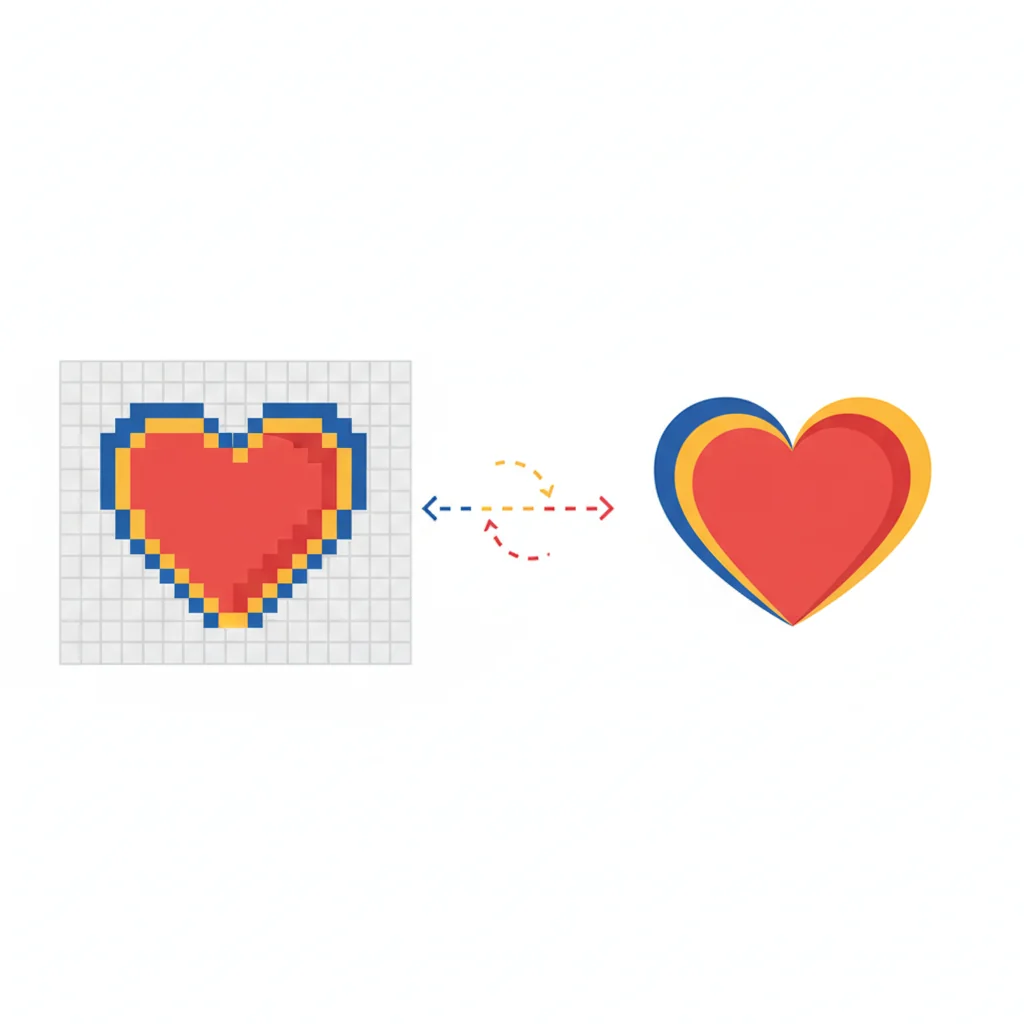
Raster images (pixels) are like a Lego mosaic. You build a picture out of tiny colored squares. Stand far away and it looks great. Lean in close — or try to make it bigger — and all you see are chunky blocks. Each square is locked in place.
Vector images (paths) are like sculpting with clay. Instead of fixed blocks, you have smooth shapes defined by simple instructions: "draw a curve from here to there, fill it with blue." You can stretch that sculpture to the size of a building or shrink it to a stamp, and it stays perfectly smooth.
Image vectorization is converting a Lego mosaic (raster) into a clay sculpture (vector). Your computer translates rigid little squares into smooth mathematical curves that scale to any size without losing quality.
Key Takeaways
- Raster images (PNG, JPG) are made of pixels — they blur when scaled up
- Vector images (SVG) are made of math-defined paths — they stay crisp at any size
- Vectorization converts the first type into the second
- You do NOT need to be a designer or know math to vectorize images
- Simple images with clear shapes give the best results
Why Should You Care About Vectorization?
Here are the most common real-world reasons people vectorize images.
1. Your Logo Needs to Work Everywhere
A logo on a business card is tiny. The same logo on a banner is enormous. A vector version works perfectly at every single size, from a favicon to a billboard.
2. Smaller Files, Faster Websites
A pixel-based logo might weigh 80-200 KB. The same design as an SVG? Often just 3-10 KB. That means faster page loads and better search engine rankings.
3. Easy Color and Style Changes
Want to change your logo from blue to red? In a vector file, change one color value and you're done. In a pixel image, you'd need to carefully paint over every blue pixel.
4. Print Shops Require It
Professional printers — for business cards, T-shirts, stickers, signage — will ask for vector files. It's the industry standard for crisp output at any print size.
5. Future-Proofing Your Brand
Screens keep getting sharper. A PNG that looks fine on a 1080p monitor may look fuzzy on a 4K display. Vectors are resolution-independent by nature.
A Full Year of Conversions for $49
Starter Annual: 25 conversions every month, $49 for the whole year. That is about $4.08 a month · Cancel anytime
Get the Annual DealVisual Quality Comparison
| Feature | Raster / Pixel (PNG, JPG) | Vector (SVG) |
|---|---|---|
| Made of | Tiny colored squares | Mathematical curves |
| Scale up | Gets blurry and pixelated | Stays perfectly crisp |
| File size (logo) | 80–200 KB | 3–10 KB |
| Edit colors | Difficult, destructive | Simple, one value change |
| Best for | Photos, complex textures | Logos, icons, illustrations |
| Print quality | Depends on resolution | Perfect at any size |
| Web performance | Heavier | Lighter and faster |
What Vectorizes Well — and What Doesn't
The simpler and cleaner the original image, the better the result.
Great results (you'll love it):
- Logos with solid, flat colors
- Icons and symbols
- Line art, sketches, and simple illustrations
- Text and lettering
- Geometric shapes and patterns
Decent results (with some cleanup):
- Logos that include gradients
- Cartoon characters
- Moderately detailed illustrations
Warning: Keep expectations realistic with photographs. Vectorization is not designed to convert photos into vectors that look photorealistic. A photograph of your dog will come out looking like a stylized, posterized illustration — which can be a cool artistic effect, but it won't be a photo-quality copy. Vectorization shines brightest with graphics, logos, and illustrations.
Step-by-Step: Vectorize Your First Image (Absolute Beginners)
Ready to try it? No software to install, no experience required.
Step 1: Choose a Simple Image
Pick a logo, icon, or simple illustration. A PNG or JPG with clear edges and not too many colors is perfect for your first try.
Pro Tip: Start with something simple. Your very first vectorization should be a clean logo or icon with 2–5 solid colors. This sets you up for a satisfying "wow, it works!" moment instead of frustration. You can tackle complex images once you see how the process feels.
Step 2: Upload to VectoSolve
Head to vectosolve.com and upload your image. The AI engine analyzes it automatically — no settings to configure.
Step 3: Let the AI Work
In about 5 seconds, VectoSolve's AI detects edges, identifies color regions, and builds smooth vector paths. You don't need to understand the math.
Step 4: Preview Your Vector
You'll see a side-by-side preview. Zoom in on both images — notice how the original gets blocky while the vector stays smooth? That's mathematical paths at work.
Step 5: Download Your SVG
Hit download and you've got a production-ready SVG file. Open it in any design tool, drop it into your website, or send it to a print shop.
That's it. Five steps. No design degree required.
Explore more conversion options on the VectoSolve tools page.
Free SVG Tools for Crafters
Design Checker · Color Separator · Mat Preview · Offset Generator · Text to SVG
Check Your SVG FreeHow Does Vectorization Actually Work? (The Non-Scary Version)
You don't need to know these details to use vectorization, but if you're curious:
Edge detection — The software scans your image and finds where one color meets another. Imagine tracing around every shape with a pencil.
Path creation — Those outlines become smooth mathematical curves. Like replacing a jagged pencil line with a perfectly smooth ribbon.
Color filling — Each enclosed shape gets filled with the right color, like a coloring book neatly painted in.
Optimization — Extra points get cleaned up, keeping the file small without losing visual quality.
Modern AI tools like VectoSolve add a layer of intelligence — they understand what shapes represent and make smarter tracing decisions.
Common Terms Glossary
| Term | What It Means |
|---|---|
| Raster | An image made of pixels. PNG, JPG, BMP, and GIF are raster formats. |
| Vector | An image made of mathematical paths. SVG, AI, and EPS are vector formats. |
| SVG | Scalable Vector Graphics — the most popular vector format for the web. |
| Path | A line or curve defined by start points, end points, and curve handles. |
| Anchor point | A point along a path where the direction or curve changes. |
| Tracing | Converting a raster image to vector paths — another word for vectorization. |
| DPI / PPI | Dots or pixels per inch — a measure of resolution in raster images. |
| Bezier curve | The type of smooth curve used in vector graphics, named after Pierre Bezier. |
| Fill | The color inside a closed vector shape. |
| Stroke | The visible outline along a vector path. |
Tips for Better Results
- Use the highest resolution source you have. More pixels give the software more information. A 1000x1000 image vectorizes much better than a 100x100 thumbnail.
- Clean up before converting. Remove messy backgrounds first. A transparent PNG vectorizes more cleanly.
- Fewer colors = cleaner vectors. Five solid colors produce a tighter SVG than hundreds of gradient shades.
- Don't over-optimize. If it looks good, stop tweaking. Perfection is the enemy of done.
- Compare at different zoom levels. Check edges at 200% and 400%. If it's smooth at 400%, it'll be beautiful everywhere.
A Full Year of Conversions for $49
Starter Annual: 25 conversions every month, $49 for the whole year. That is about $4.08 a month · Cancel anytime
Get the Annual DealYou've Got This
You now understand the difference between pixels and vectors, you know when and why to vectorize, and you've seen how to do it in five simple steps.
Just try it. Upload a logo or icon to VectoSolve, see the result, and build from there. Every professional designer started exactly where you are now — curious, a little unsure, and ready to learn.
"The best time to start learning was yesterday. The second best time is right now. Go vectorize something — you might surprise yourself."
Welcome to the world of vectors.
| Concept | Raster Image | Vector Image |
|---|---|---|
| Built from | Pixels (tiny colored squares) | Mathematical paths and curves |
| Zoom behavior | Gets blurry / pixelated | Stays perfectly sharp |
| File size scaling | Grows with resolution | Stays small regardless of size |
| Best for | Photos, complex scenes | Logos, icons, illustrations |
| Common formats | JPG, PNG, GIF, WebP | SVG, EPS, AI, PDF |