
PNG or SVG? A Decision Flowchart for Designers, Developers & Marketers
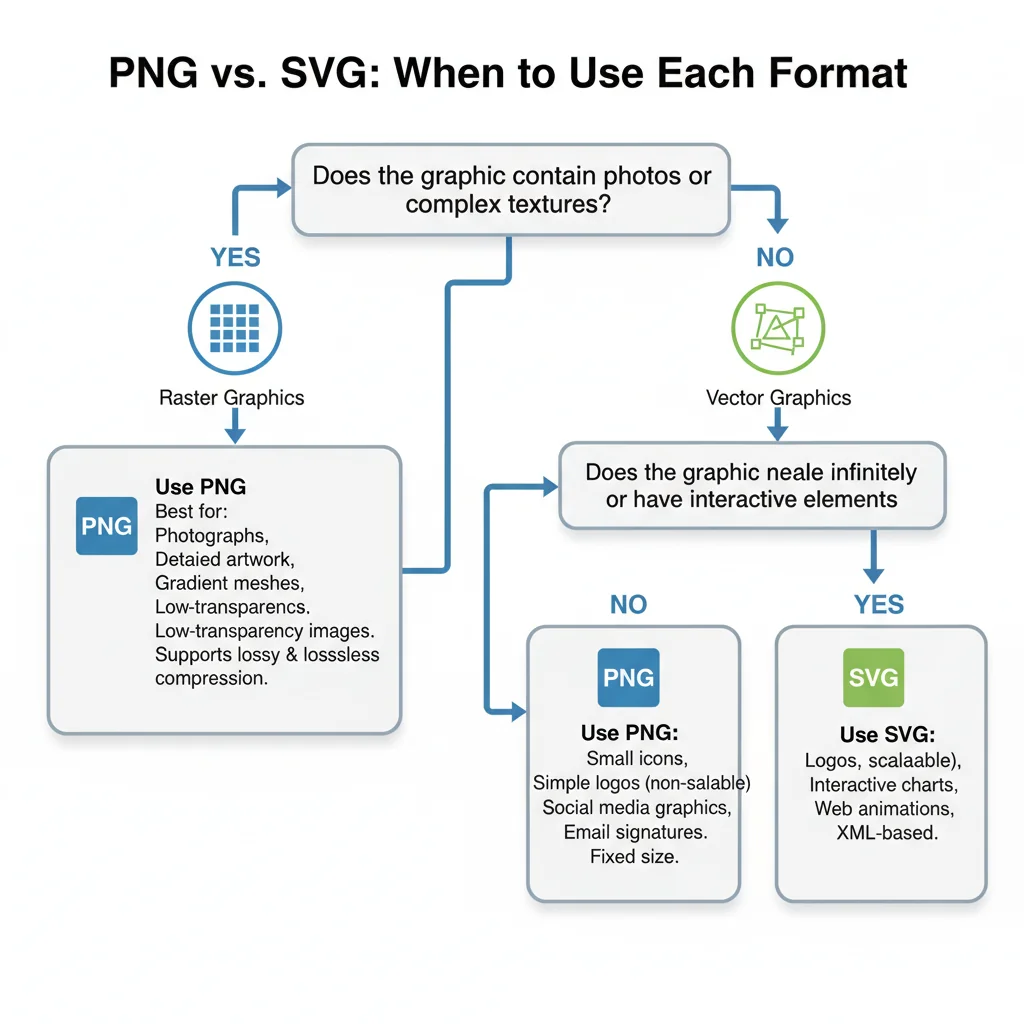
Stop guessing which format to use. Follow our visual decision flowchart to pick PNG or SVG based on your exact use case: web icons, photos, logos, print, email, and more.
Founder and developer of VectoSolve
Self-taught developer who founded VectoSolve in 2024. He builds the conversion engine and the cutting, embroidery and 3D printing exports, working with the VectoSolve team of graphic designers.
How this article was made: drafted with AI assistance, then edited and fact-checked before publication. About the author
Try it on your own file
Free preview, no signup. Drop an image and see the vector before deciding anything.
Key Takeaways
- YES → Use PNG (or WebP/AVIF for better compression).
- NO → Is it an icon, logo, illustration, or UI element? - YES → Use SVG. Ship it, you're done. - NO → Does it have fewer than ~256 flat colors? - YES → SVG will be smaller and crisper. - NO → PNG wins on file size; test both and measure.
Every image you ship is a choice — the wrong format costs you page speed, rendering quality, or both. This guide gives you technical depth to pick confidently between PNG and SVG every time, with real benchmarks and code you can copy.
How Browsers Actually Render Each Format
PNG: Pixel Grid Decode
- Browser downloads the binary, decompresses the DEFLATE stream.
- Decoded bitmap is rasterized into a GPU texture.
- The texture composites at native pixel dimensions. Scale up and the browser interpolates — hello, blur.
SVG: DOM + Paint
- Browser parses XML into a DOM subtree (or image context via
<img>). - Every
<path>,<rect>,<circle>resolves against the current viewport. - Vector instructions rasterize on the fly at any resolution — 1x, 2x, 100x. Always sharp.
SVG rendering cost scales with path complexity, not display size. A 50-path logo renders identically at 16 px or 1600 px. PNG cost scales with pixel count — a 3000 px hero decodes far slower than a 300 px thumbnail.
Deep Technical Comparison
Compression
- PNG uses lossless DEFLATE. Great for flat colors, but photos balloon — 1200x800 easily hits 1-2 MB.
- SVG is plain-text XML that compresses spectacularly with brotli. A 12 KB SVG routinely transfers at 3 KB.
Transparency
- PNG stores an 8-bit alpha channel — smooth per-pixel transparency.
- SVG supports
opacity,fill-opacity,rgba(), plus masking and clipping paths.
Animation
- PNG is static (APNG exists but has limited tooling).
- SVG supports SMIL, CSS keyframes, and JS-driven animation — all resolution-independent.
Performance Benchmarks
Real numbers from a 2026 Lighthouse audit (Moto G Power, Chrome 124, 4G throttle):
| Asset | PNG size | SVG size | PNG decode | SVG paint | CLS impact |
|---|---|---|---|---|---|
| Logo (3-color) | 24 KB @2x | 2.8 KB | 4 ms | 1 ms | None |
| Icon set (20 icons) | 140 KB | 18 KB sprite | 22 ms | 6 ms | 0.02 (PNG shift) |
| Flat illustration | 310 KB @2x | 45 KB | 38 ms | 12 ms | 0.05 vs 0 |
| Detailed map (500+ paths) | 180 KB | 420 KB | 18 ms | 52 ms | Similar |
| Product photo | 95 KB | N/A | 12 ms | N/A | N/A |
Warning: SVGs with embedded raster images are the worst of both worlds. An <image href="photo.png"/> inside SVG gives you SVG parse overhead plus full bitmap decode, often larger than shipping the PNG alone. Extract the raster — serve it as a separate <img> and keep the SVG purely vector. VectoSolve's SVG optimizer flags embedded rasters automatically.
A Full Year of Conversions for $49
Starter Annual: 25 conversions every month, $49 for the whole year. That is about $4.08 a month · Cancel anytime
Get the Annual DealDecision Matrix
| Use Case | Best Format | Why |
|---|---|---|
| Logo / brand mark | SVG | Scales favicon to billboard; CSS-colorable |
| UI icons | SVG | Tiny file size, styleable, animatable |
| Hero illustration (flat) | SVG | Retina-ready without 2x/3x assets |
| Hero illustration (textured) | PNG / WebP | Vector complexity exceeds raster size |
| Product photography | PNG / WebP | Photographic detail requires pixels |
| Screenshots | PNG | Pixel-perfect fidelity matters |
| Data visualization | SVG | Accessible, interactive, scales anywhere |
| Background pattern | SVG | Tiles perfectly, sub-1 KB common |
| Social share image | PNG | Platforms require raster; fixed dimensions |
| Animated micro-interaction | SVG + CSS | No sprite sheets, resolution-independent |
Code Examples You Can Steal
Responsive SVG (scales to container)
<svg viewBox="0 0 120 40" role="img" aria-label="Logo"
     class="logo" xmlns="http://www.w3.org/2000/svg">
  <path d="M10 35 L25 5 L40 35" fill="currentColor"/>
  <text x="50" y="30" font-size="16" fill="currentColor">vectosolve</text>
</svg>

<style>
  .logo {
    width: 100%;
    max-width: 240px;
    height: auto;
    color: #0f172a;
  }
  @media (prefers-color-scheme: dark) {
    .logo { color: #f8fafc; }
  }
</style>
Responsive PNG with srcset
<img
  src="/images/hero-800.png"
  srcset="/images/hero-400.png 400w,
         /images/hero-800.png 800w,
         /images/hero-1600.png 1600w"
  sizes="(max-width: 600px) 100vw, 800px"
  alt="Dashboard screenshot showing analytics"
  width="800" height="450"
  loading="lazy" decoding="async"
/>
The <picture> Element: Best of Both Worlds
<picture>
  <source srcset="/images/photo.avif" type="image/avif" />
  <source srcset="/images/photo.png" type="image/webp" />
  <img src="/images/photo.png" alt="Product with transparent background"
       width="600" height="600" loading="lazy" />
</picture>
Pro Tip: The smartest teams use both formats strategically. Ship SVG for every logo, icon, and illustration. Ship optimized PNG/WebP/AVIF for every photo. For complex hero graphics, try a hybrid: SVG foreground elements composited over a compressed raster background via CSS — sharp text and icons with a photographic backdrop at minimal weight. VectoSolve makes the PNG-to-SVG leg of that workflow instant.
Browser Support and Edge Cases
SVG
- Full support in every modern browser since ~2015.
- SVG fonts:
<text>uses system/web fonts. Convert text to paths for pixel-perfect logos (but you lose accessibility). - External sprites:
<use href="sprite.svg#icon">doesn't work cross-origin in some Safari versions. Inline or use same-origin URLs. - Security: Inline SVG can execute JavaScript. Never inline untrusted user-uploaded SVGs without sanitization.
PNG
- Universal support — every browser, email client, and platform. Zero edge cases.
- Color profiles: Embedded ICC profiles render differently in Safari vs Chrome. Strip them during optimization.
- APNG: Supported in modern browsers but poor tooling and larger files than SVG/CSS animation.
Free SVG Tools for Crafters
Design Checker · Color Separator · Mat Preview · Offset Generator · Text to SVG
Check Your SVG FreeOptimization Checklist
SVG
- Run through SVGO or VectoSolve's optimizer to strip metadata.
- Remove hidden layers, unused
<defs>, empty groups. - Simplify paths — fewer control points means fewer bytes.
- Serve with
Content-Encoding: br(brotli). - Inline critical SVGs to eliminate a network round-trip.
PNG
- Use
oxipng,pngquant, or Squoosh to reduce file size. - Export at exactly the dimensions needed — don't ship 4000 px for a 400 px slot.
- Provide
srcsetwith 1x and 2x variants. - Set explicit
width/heightto prevent CLS. - Add
loading="lazy"for below-fold images.
When to Convert Between Formats
PNG to SVG
You have a raster logo and need a scalable version. Manual tracing takes 30+ minutes. AI-powered vectorization on VectoSolve takes seconds and produces clean, optimized paths.
SVG to PNG
You need a raster export for social sharing or a platform that doesn't accept SVG. Use VectoSolve's SVG-to-PNG converter to export at any resolution with transparent or solid backgrounds.
Conclusion
There is no universal "best" format — only the best format for the job. SVG dominates for anything that scales, animates, or gets styled with code. PNG and its modern cousins (WebP, AVIF) dominate for photographic and high-complexity imagery.
The decision tree is short: vector graphic → SVG. Photograph → raster. Complex illustration → benchmark both. Follow the code examples above, optimize your assets, and you'll ship pages that are fast, sharp, and future-proof.
Need to convert between formats? VectoSolve handles both directions — PNG to SVG vectorization and SVG to PNG export — so you always have the right format on hand.
| Use Case | Recommended Format | Why |
|---|---|---|
| Logos & Icons | SVG | Scales to any size, tiny file, CSS-styleable |
| Product Photos | PNG (or WebP) | Photographic detail requires raster pixels |
| UI Illustrations | SVG | Crisp at all resolutions, animatable |
| Screenshots | PNG | Pixel-perfect reproduction of screen content |
| Charts & Diagrams | SVG | Accessible text, interactive, responsive |
Related guides: Best PNG to SVG converters 2026 · Vector file format comparison