
Free STL to SVG Converter
Drop an STL file here
Choose an STL fileSTL up to 80 MB, flattened on this computer, never uploaded
No model to try?
A laser, a Cricut or a vinyl cutter follows flat lines, while an STL is a solid made of small triangles. This converter flattens those triangles into closed shapes you can cut: the silhouette of the model seen from the top, the front or the side, its cross-section at the height you choose, or one cross-section per sheet of material for a layered build. The SVG is drawn at the model's own size, in millimeters, and the STL never leaves your computer.
- Silhouette from the top, front or side, with every hole that runs right through
- A cross-section at any height, or one per layer of your sheet thickness
- Inches, centimeters or meters: pick the unit the STL was drawn in
Four STL files run through the converter
Each card is a real run of the converter at the top of this page, with the view and shape named under every picture. The hill, the pawn and the bracket were modeled for this page, and the gear is the sample that the button above loads. The three STL files and all six SVG files can be downloaded.
Outline or slice: the sample gear
From the top, the outline is everything a camera above would see: the toothed wheel with its five holes. The hub stands on the solid part of the wheel, so it hides inside that silhouette. A slice at 9 mm passes above the 6 mm wheel and cuts the hub alone, a ring 24 mm across.

Top outline59.088 × 59.088 mm, 1 piece, 5 holes, 4,525 bytessample-gear-top-outline.svg 
Top view, slice at 9 mm24 × 24 mm, 1 piece, 1 hole, 4,214 bytessample-gear-slice-9mm.svg sample-gear.stl, made by the sample gear button aboveBinary STL, 96,084 bytes, 1,920 triangles, 59.09 × 59.09 × 12 mm read in millimeters, closed mesh
Layers for a stacked relief
A hill with two summits on a 2 mm base, 60 mm square and 14.9 mm tall, cut in 3 mm layers. Each layer is the slice through its middle: the first is the whole square base, the third splits into two islands, and the fifth keeps only the higher summit. Cut them from 3 mm plywood and glue them in order.
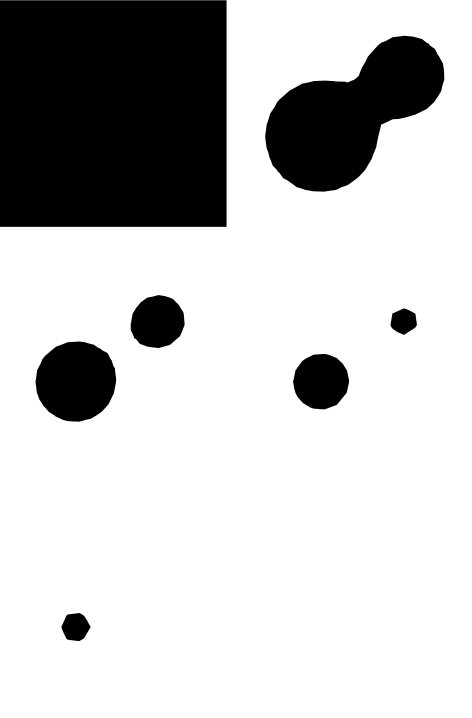
Top view, layers of 3 mm on one sheet125 × 190 mm, 5 layers (1, 1, 2, 2, 1 pieces from the bottom up), 3,387 bytestwo-peak-hill-layers-3mm-sheet.svg two-peak-hill.stlBinary STL, 52,084 bytes, 1,040 triangles, 60 × 60 × 14.9 mm read in millimeters, closed mesh
A flat silhouette: chess pawn
A pawn turned from a profile, with 24 flat sides around. Seen from the front, its outline is one piece 28 mm wide and 46 mm tall, the shape you would trace around its shadow: cut it from flat stock for a two-dimensional chess set or an ornament.

Front outline28 × 46 mm, 1 piece, no hole, 581 byteschess-pawn-front-outline.svg chess-pawn.stlBinary STL, 57,684 bytes, 1,152 triangles, 28 × 28 × 46 mm read in millimeters, closed mesh
A drilling template from a part drawn in inches
A shelf bracket modeled in inches and saved as a text STL. Read as millimeters it would measure 2 × 1.25 × 1.25 mm; with the unit set to inches it is 50.8 × 31.75 × 31.75 mm. Its top outline marks the two screw holes of the base, and the front outline shows the hole in the upright.

Top outline50.8 × 31.75 mm, 1 piece, 2 holes, 702 bytesshelf-bracket-inches-top-outline.svg 
Front outline50.8 × 31.75 mm, 1 piece, 1 hole, 447 bytesshelf-bracket-inches-front-outline.svg shelf-bracket-inches.stlText (ASCII) STL, 42,941 bytes, 276 triangles, 50.8 × 31.75 × 31.75 mm read in inches, closed mesh
What an STL to SVG conversion is for
Stacked layers
Set Layers to the thickness of your sheet, such as 3 mm plywood or 5 mm foam board, then glue the cut pieces in order. In the ZIP, each file is numbered from the bottom and named with its height, like two-peak-hill-layer-01-1.5mm.svg.
Flat silhouettes
Front and Side press the whole model flat along the view. The result is its profile, for a sign, an ornament or a flat game piece.
Templates and plans
The top outline is the footprint of a part at full size, with its through holes: a pattern to mark drill holes, to check a fit, or to plan a part on a sheet.
Blade cutters
Each piece is a closed path, ready for a Cricut or another blade cutter to cut around: an outline can become a vinyl decal and thin layers a paper relief.
What stays and what goes between STL and SVG
The size stays
The SVG states its size in millimeters, and every point is written to the thousandth of a millimeter.
Through holes stay
A hole that runs all the way through stays open in the outline. A pocket or a blind hole is hidden by the material behind it; a slice at its height shows it.
The depth goes
An outline presses slopes, fillets and steps into one edge, so the SVG holds no heights. Only the names of slice and layer files keep the height they were cut at.
The facets stay
Curves keep the straight facets of the STL: from the top, the 24-sided pawn is a 24-sided shape. A finer STL gives smoother curves.
One path per piece
Each separate piece is a single closed path with its holes inside it. Holes run the opposite way to their piece, so the shape fills the same under the even-odd and the nonzero rule.
Gaps are bridged
Where triangles are missing or corners do not quite meet, a slice is closed with straight lines and the panel gives their number. A missing triangle leaves a straight gap, so the line drawn is the edge it would have given.
How to convert an STL file to SVG
- 1
Open the STL
Drag the .stl file into the converter, or click it to browse. Check the size in the Model line; if it looks 25.4 or 1,000 times off, set the unit the file was drawn in.
- 2
Choose a view and a shape
Top, Front or Side sets the direction. Outline flattens the whole model, Slice cuts it where the slider says, and Layers cuts one slice per layer of the thickness you type.
- 3
Save the SVG or the ZIP
Download SVG saves an outline or a slice. With Layers, Download ZIP gives one SVG per layer and One SVG sheet puts every layer side by side in one file.
What the converter leaves to you
- Only STL files go in: a 3MF, OBJ, STEP or IGES file is turned down with a note to export an STL first.
- Curves stay faceted: no facet is smoothed and no arc is rebuilt from the triangles.
- It does not repair the STL. It bridges the gaps it finds in a slice and counts them, but a model with large holes can still give slices that need checking.
- Each piece is a filled black shape, with no color, no engraving lines and no text.
- Files up to 80 MB with at most 2,000,000 triangles, and no more than 100 layers in one go.
Starting from a drawing rather than a 3D model?
Then there is nothing to flatten. A PNG or JPG of the shape goes into the image converter in this section, which redraws it as vector paths and returns an SVG for the same cutters.
One free preview a day, no signup, with a watermark. The clean SVG is $6.99 for that one file, or 25 files for $7.99 a month with the Starter plan.
STL to SVG FAQ
How do I convert STL to SVG?
Load the STL in the tool above, choose Top, Front or Side, then Outline, Slice or Layers. The SVG shows in the preview with its size in millimeters; Download SVG saves it, or Download ZIP for layers.
Is this STL to SVG converter free?
Yes: outlines, slices, layers and the ZIP are made on your computer at no charge, with no account. The one paid tool on this page is the image converter lower down, and it shows a free preview first.
Why is my SVG tiny or huge?
An STL holds plain numbers and never says their unit, so they are read as millimeters unless you pick another unit under the preview. The bracket above was drawn in inches: read as millimeters it is 2 × 1.25 mm, read as inches 50.8 × 31.75 mm. A model saved in meters needs meters, or it comes out 1,000 times too small.
What is the difference between an outline and a slice?
An outline is the whole model pressed flat along the view, so it shows every part that would block light from that side. A slice is the solid cut at one height, like a single layer of a 3D print. On the sample gear, the top outline has 5 holes, while the slice at 9 mm is only the hub, a ring 24 mm across.
How many layers will I get?
One per layer thickness, counted from the bottom, and a layer is only made when the model reaches its middle. The 14.9 mm hill in 3 mm layers gives 5, cut at 1.5, 4.5, 7.5, 10.5 and 13.5 mm: a 15 mm stack for a 14.9 mm model.
Can I cut the SVG with a laser cutter or a Cricut?
Yes. The pieces are filled black shapes in millimeters, each one a closed path. Set them to cut rather than engrave in your laser software; a blade cutter follows the edge of each shape. Check the size after importing.
What if my STL has holes or broken triangles?
The Model panel checks the mesh first. In a slice, each gap left by missing triangles is closed with a straight line and counted. We removed 28 of the 1,152 triangles of chess-pawn.stl at random: all 15 of its 3 mm layers came back with the same pieces, holes and area as the full model.
Can I get the side profile of a model?
Yes: choose Front or Side. Front looks at the model from the front with X to the right, Side looks from its right-hand side with Y to the right, and Z points up in both, so nothing comes out mirrored.
Check a model first in the STL viewer, go the other way with SVG to STL, or hand a cut file to DXF software with SVG to DXF. See all VectoSolve tools for the others.