
Turn a Picture into a Vinyl Decal
A decal is cut, not printed: the blade needs solid shapes with clean edges. Upload a photo, a logo or a drawing and get a cut file with the background removed, ready to cut from adhesive vinyl on a Cricut, a Silhouette or a plotter.
- Background removed, only the subject is cut
- Solid shapes, with no gradients to confuse the blade
- Fewer tiny pieces, quicker to weed
Works with Cricut Design Space, Silhouette Studio, Leonardo Design Studio and most vinyl cutter software.
From a picture to a vinyl decal
- 1
Upload the picture
Drop a photo, a logo or a drawing as PNG, JPG or WebP. A subject with a clear outline works best: a pet, a car, a logo. The free preview shows the cut shapes before you pay.
- 2
Choose the preset
Clean Cut for a one-color decal, Balanced for most pictures, High Detail for a multi-color decal you will layer.
- 3
Download and size it
Take the SVG into Design Space, Silhouette Studio Designer Edition or Leonardo, then set the decal width before you cut.
- 4
Cut, weed and apply
Cut the adhesive vinyl without mirroring, weed away the extra vinyl, lay transfer tape over the design, then apply it to a clean, dry surface.
Decal settings that matter
Mirror off for adhesive vinyl
Mirror is for iron-on vinyl, which is cut face down. Adhesive vinyl is cut face up, so leave Mirror off. The exception is a decal stuck inside a window to be read from outside: mirror that one.
Permanent or removable vinyl
Use a permanent outdoor vinyl for cars, mailboxes and windows that see weather, and a removable vinyl for walls and indoor decals you may take down.
Smallest parts
Very thin lines and tiny letters tear while weeding. Scale the decal up, or pick Clean Cut so small fragments are merged or dropped.
Multi-color decals
A multi-color decal is cut one vinyl color at a time, then layered. Sort the SVG layers by color, cut each color from its own sheet and line them up with transfer tape.
Decal problems, and the fix
The background got cut too
A photo background traces as shapes. The vinyl converter removes it before tracing, so only the subject becomes a cut line.
Weeding a photo decal takes forever
The picture traced into hundreds of specks. Use Clean Cut, or crop the photo to the subject first: a clear subject on a plain background cuts best.
The decal peels off the car
Indoor or removable vinyl was used outside. Cut car and window decals from a permanent outdoor vinyl and apply them to a clean, dry surface.
The edges look jagged once enlarged
The cutting software traced the image at its pixel size. The SVG from this page is made of smooth curves, so the edges stay clean at any decal size.
For decal shops and craft sellers
Customer photos turned into decals that weed cleanly
Pet portraits, memorial decals, truck window logos: customers send phone photos. Convert each one here, or send the whole order for a quote and get cut files checked before delivery.
Free preview of the cut shapes, no signup. Send a full order and the quote prices each design.
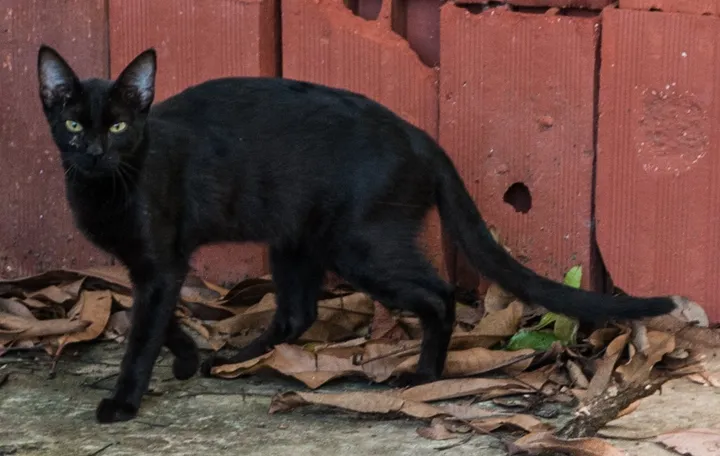
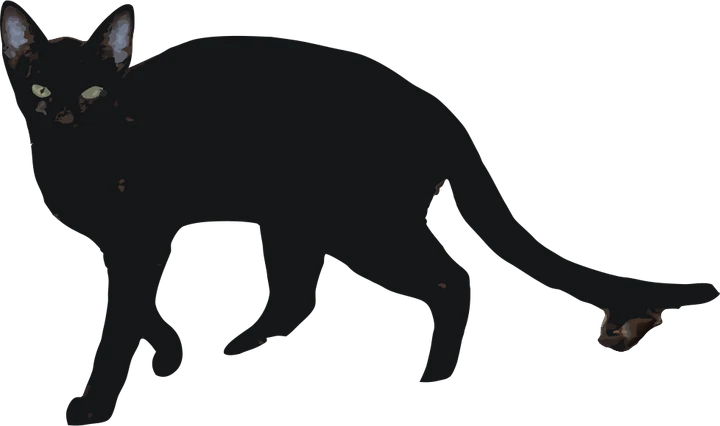
Which program opens each file
- SVG Cricut Design Space, Silhouette Designer Edition, Leonardo
- DXF Silhouette Studio Basic Edition and other cutter software
- PNG a mockup to send the customer for approval
Product photos are mockups: each design is the real VectoSolve file, not retouched. Source photos are public domain or CC0. Photo: Wilfredor, Wikimedia Commons, CC0.
Custom · On quote
Top-of-market quality for complex jobs: large-format murals, detailed illustrations, photo to vector, multi-layer print files. Finished by hand by our team and checked before delivery.
No machine at the end of the job? The VectoSolve vectorizer turns any picture into an SVG, and the PNG to SVG cut file converter keeps the paths ready to cut.
Image to vinyl decal FAQ
How do I turn a picture into a vinyl decal?
Convert the picture into a cut file with the background removed, size it in your cutting software, cut it from adhesive vinyl, weed it and apply it with transfer tape.
What file do I need to cut a vinyl decal?
A vector cut file: an SVG for Cricut Design Space and most cutters, a DXF for Silhouette Studio Basic Edition. A JPG or PNG only works after the cutting software traces it.
Can any photo become a decal?
A photo with one clear subject works best. Busy scenes and soft shadows trace into many small pieces that are hard to weed, so crop the photo to the subject first.
Should I mirror a vinyl decal before cutting?
Not for adhesive vinyl applied to the outside of a surface. Mirror only iron-on vinyl, or a decal applied inside a window to be read from outside.
Can I make a multi-color vinyl decal?
Yes. Pick High Detail to keep the colors, cut each color from its own vinyl sheet, then layer them with transfer tape.
More machine guides: all VectoSolve tools