JPG, PNG, WebP, GIF, SVG, PDF or TIFF up to 50 MB, read in your browser, nothing uploaded
No picture at hand? Try it on a , a or a
Drop a picture, pick the paper and how many sheets wide the poster should be, and download one PDF with a page per sheet. The tool draws the sheets over your picture and tells you how many pixels each inch of the poster gets, before you print anything.
Letter, A4, Legal, Tabloid or A3, portrait or landscape, 1 to 20 sheets across or a width in inches or centimeters
A margin on every side, a strip repeated on the next sheet, cut marks and a label such as B2 on each page
JPG, PNG, WebP, GIF, SVG, PDF and TIFF files, read in your browser: nothing is uploaded
Three real posters, ready to print
Each PDF below was written by the code of this tool from a file this site already serves. The photo and the 160 pixel logo are JPEGs that go in as they are: open one in the tool and you download the same file, byte for byte. Print one at actual size to see how your printer handles the margin before you make your own.
A phone photo on four A4 sheets
A1
B1
A2
B2
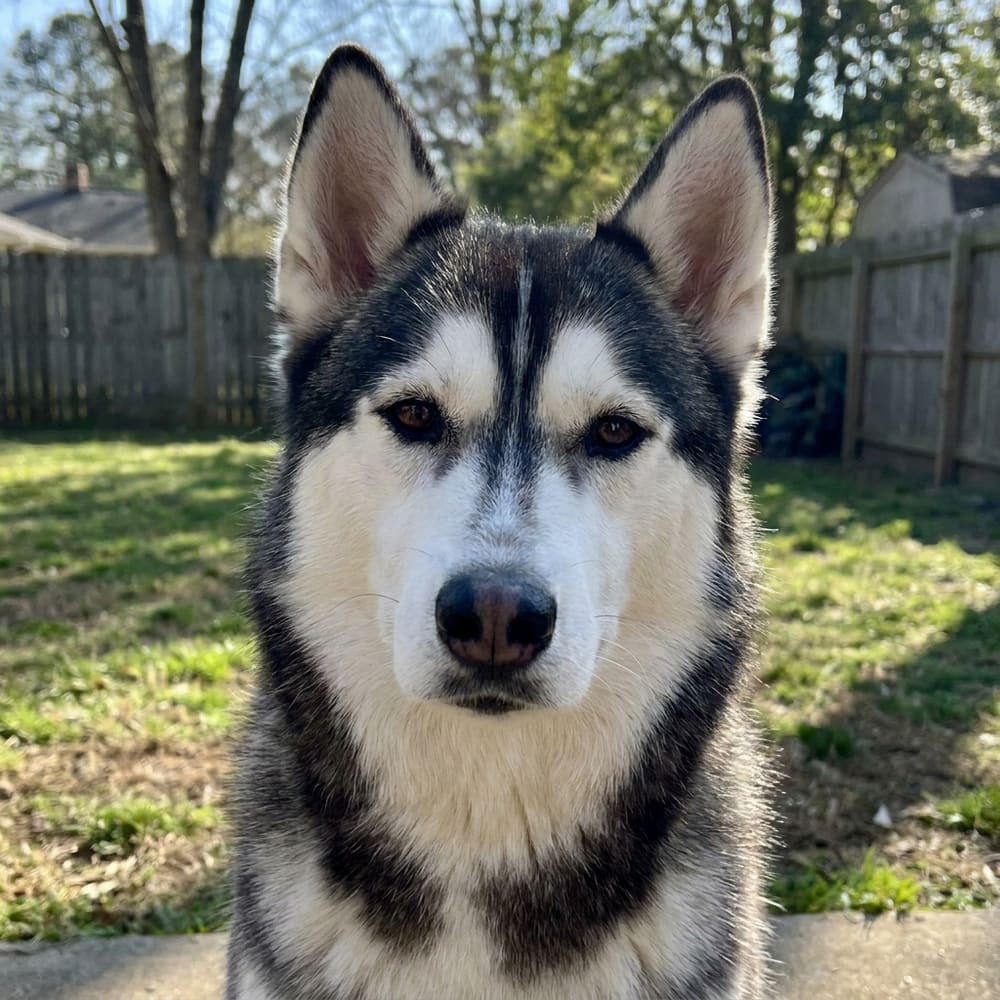
The husky photo from the done-for-you page of this site: a JPEG of 1,000 x 1,000 pixels, put in the PDF as it is.
Sheets
2 x 2 A4 sheets
Poster
14.6 x 14.6 in (37 x 37 cm)
Pixels per inch
69
One pixel prints
0.37 mm wide
Two sheets across with a 10 mm margin and a 10 mm overlap make a poster 14.6 inches wide, so the 1,000 pixels land at 69 per inch, each one a square 0.37 mm wide.
The PDF weighs 144,679 bytes, and 140,615 of them are the photo itself: it is stored once and drawn on all four pages.
The vector file the print shop service of this site delivered for that badge: rebuilt, then traced with the vector engine of the site into 62 shapes. In the tool, your browser draws an SVG at 4,096 pixels on its long side before the sheets are cut; for this PDF, the sharp image library drew it instead, on white, as a JPEG of quality 92, so the PDF you make from it is not the same file, byte for byte.
Sheets
3 x 3 Letter sheets
Poster
22.4 x 22.4 in (56.8 x 56.8 cm)
Pixels per inch
183
One pixel prints
0.14 mm wide
At the same 22.4 inches, 4,096 pixels give 183 per inch: squares of 0.14 mm, and the edges of the lettering stay clean.
Nine pages and 655,326 bytes, of which 646,780 are the drawn picture.
Each page is the paper size you chose, in reading order: A1, B1, C1 along the top row, then A2 and so on. The letter is the column and the number is the row, as in a spreadsheet.
Your picture, stored once
The picture sits in the PDF once and every page draws it, moved and cut to its own sheet. The 9 pages of the 160 pixel logo weigh 13,259 bytes, and 4,718 of them are the picture.
Nothing in the margin but marks
The picture stops at the margin you set. The margin holds only thin gray cut marks and the label of the sheet, along the top of the bottom margin and clear of the marks.
A strip printed twice
The strip along the right and bottom edges of a sheet is printed again along the left and top edges of the next one, as wide as the overlap you set. A cut mark shows where the next sheet starts.
A label on every sheet
For example: Sheet A1, 1 of 9. Poster 22.4 x 22.4 in (56.8 x 56.8 cm) on 3 x 3 Letter sheets.
Partial sheets stay blank
In the last column and the last row, a sheet is printed only as far as the picture goes. Under a 3 mm margin there is no room for cut marks, and under 6 mm none for the label: they are left out. When a last row or column would add less than 20 mm of new picture, the tool tells you, with a poster width that saves those sheets.
How big it prints, and how sharp
The first sheet adds its whole printable width, and each next sheet that width minus the overlap. On Letter paper in portrait with a 10 mm margin and a 10 mm overlap, the first sheet adds 7.71 inches across and 10.21 down, and each next one 7.32 across and 9.82 down, so three sheets across make a poster 22.35 inches wide (7.71 + 7.32 + 7.32), shown as 22.4.
Pixels per inch is the width of your picture in pixels divided by the width of the poster in inches, and each pixel prints as a square of 25.4 mm divided by that number: 3.5 mm for the 160 pixel logo above, 0.37 mm for the husky photo.
More sheets make the poster bigger, not sharper: the same picture spread wider gets fewer pixels per inch, so its squares grow.
More pixels for a sharper poster
Trace a logo or a drawing into an SVG
A logo, a drawing or lettering traced into vector shapes has no pixels of its own: this tool draws an SVG at 4,096 pixels on its long side, 183 per inch on the 22.4 inch poster above, where the 160 pixel JPEG of the same badge got 7.2. The converter traces PNG and JPG files into SVG.
One free preview a day, no signup, with a watermark. The clean SVG is $6.99 for that one file, or 25 files for $7.99 a month with the Starter plan.
Enlarge a photo first
A photo is not a drawing to trace: the upscaler makes a PNG copy 2 or 4 times as wide. This tool draws every file but a JPEG at 4,096 pixels at most on its long side, so the copy helps a photo of 2,048 pixels or less: a copy 4 times as wide would give the husky photo above 275 pixels per inch instead of 69. The tool suggests it only when it helps your picture. Upscaling comes with every plan: Starter is $7.99 a month for 25 conversions, which covers 33 upscales a month.
When a logo is too small or too damaged to trace, the file preparation service for print shops rebuilds it, as it did for the badge above. Each file is quoted.
Drag a JPG, PNG, WebP, GIF, SVG, PDF or TIFF file onto the tool at the top of this page, or click Choose a picture.
2
Set the paper and the size
Pick the paper and the orientation, then the number of sheets across or the width of the poster. The sheets appear over your picture, with the size of the poster and its pixels per inch.
3
Print and assemble
Download the PDF and print it at actual size, not fit to page. Trim the white border off the left of every sheet except column A and off the top of every sheet except row 1, lay each sheet over the strip its neighbor repeats, and tape the sheets together from the back.
Looking for the Rasterbator or Block Posters?
Both make a poster out of many sheets too. This is what their own pages said on November 24, 2026.
The Rasterbator
The Rasterbator "enlarges images to multiple pages", and "You get a multi-page pdf file".
Its FAQ: "The output is nothing but dots! Yes, that is the idea." To "blow up (and pixelate) your image", "you can select a less wild style".
Its FAQ lists "Jpeg, png, gif and webp files up to 40 MB", and says "The image is decoded by your browser".
Block Posters
Its home page: "Upload your image", "Slice your image", "Download your poster!"
Its FAQ: "Uploaded images are periodically deleted automatically."
For the dot look, the Rasterbator is built for it. This tool prints the picture as it is, keeps it in your browser, and shows the pixels per inch while you set the size.
Want dots as a vector file instead, for a screen or a stencil? The halftone generator of this site draws a picture as dots in an SVG; its download is paid. Open the halftone generator.
Poster on multiple pages FAQ
How do I print a picture on multiple pages?
Drop it into the tool at the top of this page, choose the paper and how many sheets across, and download the PDF: each page is one sheet of the poster. Print it at actual size, trim the white borders where the sheets overlap, and tape them together from the back.
How many sheets will my poster take?
On Letter paper in portrait with a 10 mm margin and a 10 mm overlap, the first sheet adds 7.71 inches across and 10.21 inches down, and each next sheet 7.32 across and 9.82 down. Three sheets across make a poster 22.35 inches wide, and a square picture then takes three rows, nine sheets in all. The tool counts them for your picture as you change the settings.
Why does my poster look blocky?
Every pixel of the picture becomes a square on the paper. The 160 pixel logo above, spread over 22.4 inches, gets 7.2 pixels per inch, so each pixel is a square 3.5 mm wide. A bigger original gives the same poster more pixels, and so does a logo traced into an SVG, drawn at 4,096 pixels on its long side. This tool draws every file but a JPEG at 4,096 pixels at most on its long side, and reads files up to 50 MB, so a copy from the upscaler, a PNG, helps only up to that size: the tool offers it for a picture of 2,048 pixels or less on its long side, when the poster gets under 150 pixels per inch.
Is this the Rasterbator?
No. The Rasterbator is another site. Its FAQ says "The output is nothing but dots! Yes, that is the idea." and lists "Jpeg, png, gif and webp files up to 40 MB". This tool prints the picture as it is and also opens SVG, PDF and TIFF files.
Is my picture uploaded?
No. Your browser reads the file, draws it when needed and writes the PDF on the page: nothing is sent to VectoSolve. The only pictures the tool fetches are the three examples, when you click one.
What margin should I set?
The margin is the white border left on every side of a sheet: make it at least as wide as the border your printer leaves blank, so the picture prints whole. Each cut mark starts 1 mm from the edge of the picture, and the label sits 1 to 3.4 mm below the area the picture can fill, so with a margin 4 mm wider than that blank border, the label and the start of every mark print too. The tool starts at 10 mm. Under 3 mm the cut marks are left out, and under 6 mm the label too.
Which files can I use?
JPG, PNG, WebP and GIF pictures, and other pictures your browser can open, such as HEIC photos in Safari; SVG files, drawn at 4,096 pixels on their long side; the first page of a PDF, drawn at 2,048 pixels on its long side; and the first image of a TIFF. Files up to 50 MB.
Is this poster tool free?
Yes, with no signup and no limit on posters: it runs in your browser. The upscaler and the SVG converter of this site are paid; their prices are next to them on this page.
Should I print at actual size or fit to page?
At actual size. Each page of the PDF is exactly the paper you chose, with the picture inside your margin. Fit to page can shrink each page to the area your printer reaches, and the poster then comes out smaller than the size the tool shows.