
AI Image Vectorizer for Logos, Drawings, Scans and Photos
An image vectorizer redraws a picture made of pixels as shapes made of paths, so it stays sharp at any size and a cutter, laser or printer can follow it. Drop a logo, drawing, scan or photo above to vectorize it with a free preview, watermarked and with no signup; the clean file comes with a plan.
How a vectorizer turns pixels into paths
Any vectorizer does the same three things, and the quality of each one decides what you get back:
- Find the colours. The picture is reduced to the colours that matter. The blended pixels along an edge, half one colour and half the other, are put back on one side or the other.
- Find the edges. Wherever one colour region meets another becomes an outline.
- Draw the curves. Each outline is redrawn as a path of points and curves, and filled with its colour.
The result is an SVG, a text file of paths. A browser, Inkscape, Illustrator or a cutting machine redraws those paths at whatever size you ask, so nothing blurs. VectoSolve does these steps with an AI model. In our tests that made the difference on the hard pictures: with background removal on, it dropped a painted door and tree bark that Potrace, the classic open-source tracer, turned into specks. On easy pictures the difference disappears, as the next section shows.
Four real pictures through the vectorizer, good and bad
Between 28 September and 2 October 2026, our design team ran nine pictures through VectoSolve, once each, with the default settings of the page each one was made on and no cleanup, and measured every SVG from the file. For five of them we also ran Potrace, the open-source tracer behind Inkscape's Trace Bitmap.
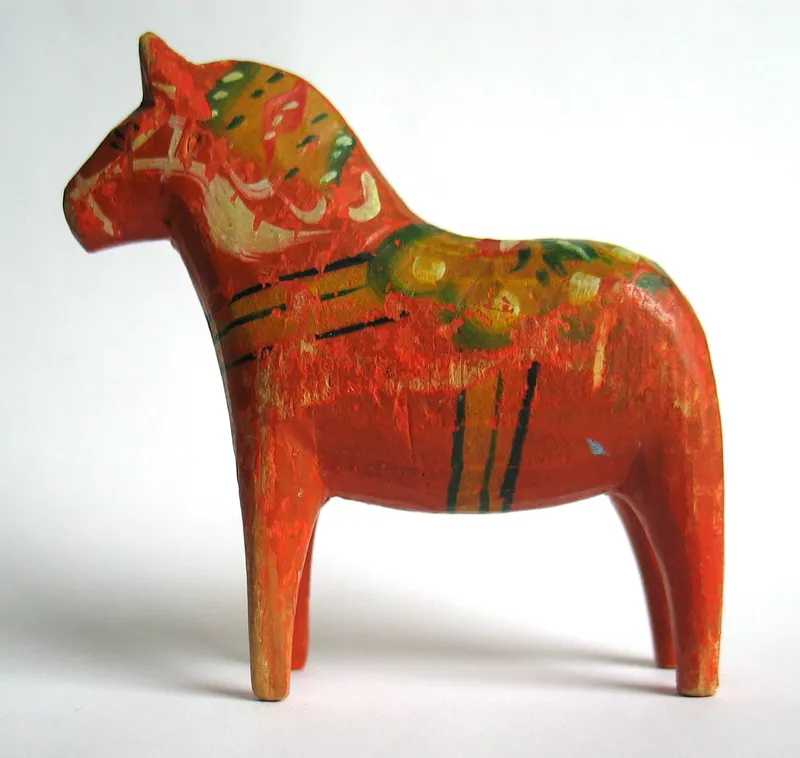
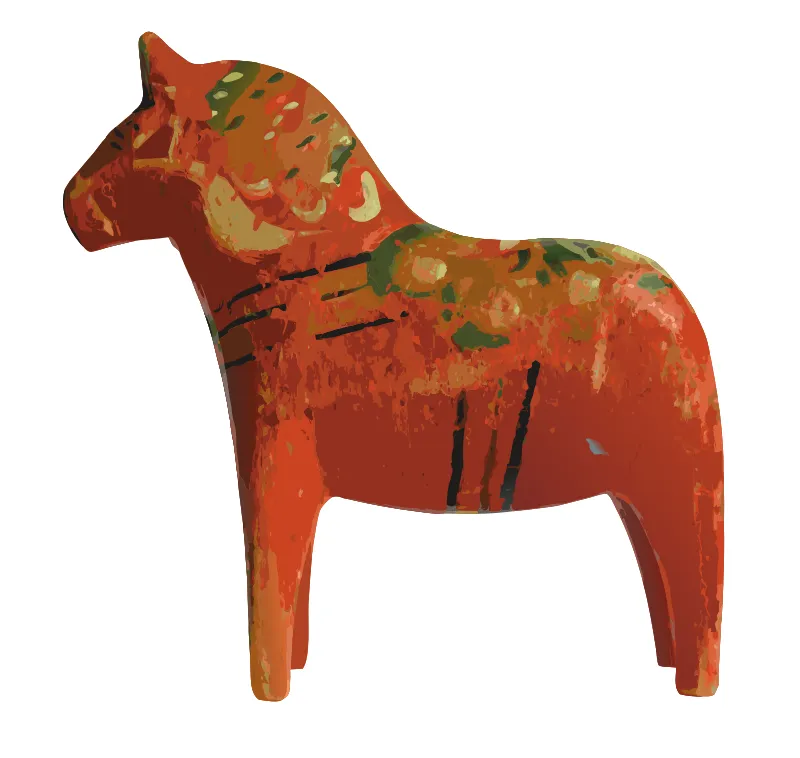
Picture: Dalecarlian horse.jpg, by Mysid, public domain. Cropped or resized, colours untouched.
- Weathervane rooster, dark silhouette on a plain sky: 17 paths, 12.5 KB. Potrace gave one clean black shape, 7.5 KB. For a one-colour decal on a plain background, the open-source tool is all you need.
- Rusty horseshoe on a painted door: 147 paths, 83.2 KB, door removed, the U shape kept as one object. Potrace traced the peeling paint too: thousands of specks around the shoe, 186.6 KB.
- Trail marker on a mossy tree: 302 paths, bark removed, disc and arrow kept. Potrace failed: the bark became a black mass of noise and the arrow disappeared into the disc.
- Hand-painted wooden horse, shown above: 2,340 paths and 1.1 MB, every scratch in the paint traced. It looks like the photo, and that is the trap: it is a colour print, not a cut file. For a laser, you would keep the outline and the black stripes only.
What the four say: the background decides more than the tool, and the number of colours decides more than any setting. All nine results, with the SVG files and the Potrace traces to download, are on nine real conversions, measured.
Logos, drawings, scans, photos: what to expect from each
- Logos and lettering: few colours and sharp edges, the best case. Expect a handful of paths. Thin letters in a small picture come back approximate, so use the biggest source you have; logo to vector is the page made for brand marks.
- Drawings and sketches: ink on plain paper vectorizes well. A felt-tip drawing photographed on a phone came back very faithful, at 703 paths. For line art that should stay single lines, centerline trace follows the middle of each stroke instead of its two edges.
- Scans: the paper colour drops out; specks and scan lines can survive as tiny paths. The 1914 whale scan came back as 12 paths with a few extra specks.
- Photos: a stylised picture made of flat colour shapes, never a copy of the photo. Good for posters, stickers and engraving with shading. To screen print a photo, the halftone generator turns it into printable dots instead.
Vectorize for a machine: what each one needs
- Cricut and Silhouette: closed shapes, one colour per material. Each path is roughly one piece the machine cuts or the software has to handle, so the 17-path rooster is a quick job and the 703-path drawing is a long weeding session. Silhouette Studio Basic Edition reads DXF, not SVG: use image to DXF for it.
- Laser: an outline to cut and, if you want, filled areas to engrave. LightBurn, xTool Creative Space and Glowforge import the SVG directly; older CAM software wants the R12 DXF from the same page.
- Embroidery: a vector is not a stitch file. The embroidery converter builds DST, PES or JEF stitches from the picture, fitted by default to a 4x4 in (100 x 100 mm) hoop with 5 mm of clearance on every side. When the design would come out too small to stitch, no file is produced and you are not charged.
- Print: the SVG prints at any size; when the shop asks for EPS or PDF, image to EPS gives both in one ZIP.
Before you vectorize: a 30-second checklist
- At least 800 px on the long side. The smallest clean result in our test came from a 920 x 570 px photo.
- A plain or transparent background, or remove it first. The vectorizer warns you when it detects a busy one.
- As few colours as the final object needs: one for a decal, three for a three-layer project.
- Sharp edges. Blur and heavy JPEG compression turn into wobbly outlines.
- Many files? With a plan, batch mode takes up to 50 at once.
Cutting the result? SVG for Cricut and SVG for laser cutting cover the import settings for each machine.
Who runs this vectorizer, and what users say
VectoSolve is made by a team of graphic designers, with Robin Monteiro as founder and developer. We publish our failures, like the wooden horse above, because a vectorizer that only shows its best logo tells you nothing about your own picture.
On G2 the product is rated 4.1 out of 5, from 4 reviews. Read them there, as their authors wrote them.
How Does AI Vectorization Compare to Manual Tracing?
Manual Tracing
VectoSolve AI
What Is the Best Image to Vector Converter in 2026?
VectoSolve uses AI-powered vectorization to deliver faster, more accurate results than traditional auto-trace tools. Here's how it compares:
| Feature | VectoSolve | Convertio | AutoTracer | Vectorizer.ai |
|---|---|---|---|---|
| AI-Powered | ||||
| Speed | 2–5 sec | 10–30 sec | 5–15 sec | 5–10 sec |
| Edge quality | Clean, precise paths | Varies | Varies | Good |
| Free Tier | Watermarked preview | 2/day | Unlimited | None |
| Price/Conversion | From $0.11 on a yearly plan | $0.15 | Free | $0.99 |
| Output Formats | SVG, DXF, EPS, PDF | SVG only | SVG, EPS | SVG, PNG |
| Batch Mode | 50 files | 10 files | 1 file | 10 files |
| Background Removal | ||||
| No Signup Required | For previews |
Data as of March 2026. Prices and features may vary. AutoTracer offers unlimited free conversions but with lower accuracy and no AI.
How to Convert Image to Vector
3 simple steps, no software needed
1. Upload Your Image
Drag and drop or click to upload your image file
2. AI Converts Instantly
Our AI traces edges and creates clean vector paths
3. Download Vector
Get your scalable Vector file ready to use
Why Should You Use VectoSolve for Image to Vector Conversion?
Trusted by designers, developers and crafters
AI-Powered Accuracy
Our AI analyzes your image and creates the cleanest possible vector output
Automatic Background Removal
Option to automatically remove backgrounds during conversion
Fast Processing
Most conversions complete in just 2-5 seconds
No Software Required
Works entirely in your browser - no downloads needed
High Quality Output
Professional-grade SVG files ready for any use
Commercial License
Use converted files for any purpose including commercial
What Do Users Ask About This Converter?
8 questions about Image to Vector conversion
A tool that redraws a picture made of pixels as shapes made of paths, usually saved as an SVG. The result stays sharp at any size, every shape can be edited, and cutting machines and lasers can follow the outlines.
Drop the image into the vectorizer at the top of this page. PNG, JPG, WEBP, GIF, BMP and AVIF are accepted up to 25 MB. You see a watermarked preview first; the clean SVG downloads with a plan.
Not always. On a dark shape against a plain background, Potrace, the engine behind Trace Bitmap, gave one clean path in our tests and costs nothing. On busy backgrounds such as a painted door or tree bark it traced thousands of specks, and in single-scan mode it keeps one colour only.
Yes, but the result is a picture made of flat colour shapes. Our photo tests gave 147 to 2,340 paths and files up to 1.1 MB. That works for print and engraving; for a cut file, keep the outer outline or start from a simpler image.
Because every colour region in the picture becomes its own path. Texture, shading and blur create many small regions: a straw star photo gave 848 paths and a painted wooden horse 2,340. Fewer colours and a plain background give fewer paths.
An SVG. For DXF, EPS, AI or embroidery files, run the same picture through the image to DXF, image to EPS or image to AI converters, or the embroidery converter.
A vector is not a stitch file. The embroidery converter builds DST, PES or JEF stitches from the picture, fitted by default to a 4x4 in (100 x 100 mm) hoop with 5 mm of clearance. When the design would come out too small to stitch, no file is produced and you are not charged.
The preview is free and needs no signup; it carries a watermark. You get one preview a day. For the clean file you need a plan; current prices are on the pricing page.
What Other Converters Are Available?
Files for your trade
The same engine, set up for the machine or the shop you work with.
Explore More
VectoSolve vs Vectorizer.AI: AI Vectorizers Compared
VectoSolve vs Illustrator Image Trace: Speed & Quality Test
VectoSolve vs GIMP: Vectorization vs Image Editing
Best Super Vectorizer Alternative in 2026
Best Vector Magic Alternative in 2026
How to Vectorize an Image for Free Online
How to Convert a Logo to Vector Format
Where Can You Learn More About Image to Vector Conversion?
Vectorizing a Painting: The Honest (and Complete) Guide to Image-to-Vector Conversion
Vectorizing a painting means interpreting it, not copying it. How tracers really work, how each medium behaves under conversion, how to prepare your capture — and when not to vectorize at all.
Image to Vector for K40 and OMTech Laser Cutters: Workflow and Settings
Convert PNG/JPG to vector for K40 and OMTech laser cutters. LightBurn workflow, RDWorks tips, power/speed settings for the most common materials.
Image to Vector Converter: 10 Tools Compared (2026)
A comparison of 10 image to vector converters on quality, speed, and price.